ED Search of Laptops, Cloud Accounts, Email and Mobile Devices: Digital Evidence, Forensic Imaging and PMLA Defence
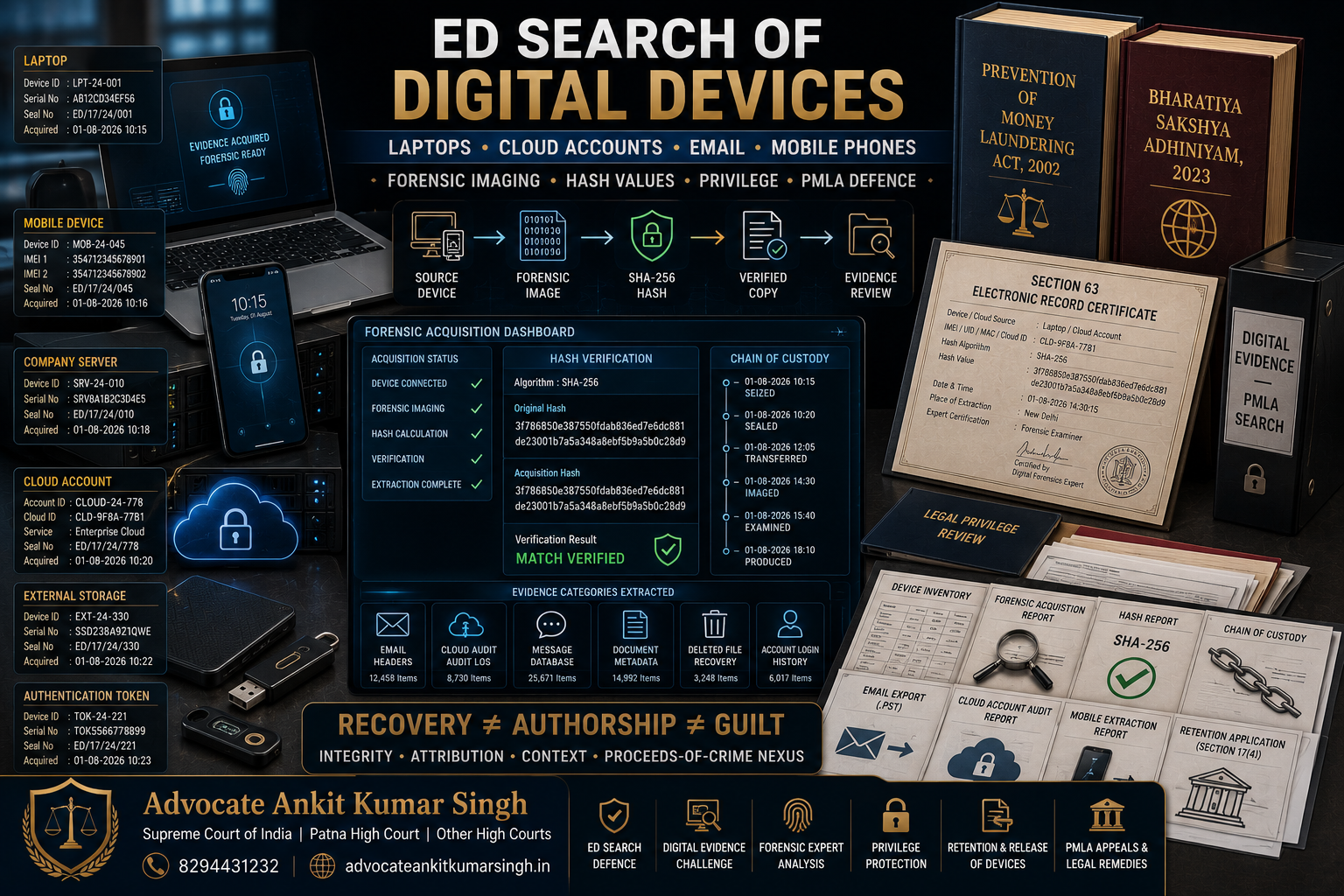
Direct Answer: The Directorate of Enforcement may search for and seize or freeze laptops, mobile phones, storage devices, company servers and electronically stored records during a lawful search under Section 17 of the Prevention of Money Laundering Act, 2002. The statutory definition of “records” expressly includes records stored in a computer.
ED may also examine data connected with email accounts, cloud-storage platforms, accounting systems, messaging applications, cryptocurrency wallets, company collaboration tools and remotely hosted databases where such information is considered relevant to the alleged money-laundering investigation.
The mere recovery of a message, spreadsheet, document or account from a device does not automatically prove:
- Who created it;
- Who sent it;
- Who controlled the account at the relevant time;
- Whether it was altered;
- Whether the complete conversation has been recovered;
- Whether the device was shared;
- Whether the document was acted upon;
- Whether the transaction mentioned in it actually occurred; or
- Whether it was connected with proceeds of crime.
A proper digital-evidence analysis therefore requires examination of the statutory search process, device identification, forensic acquisition, hash values, chain of custody, metadata, account attribution, completeness, contextual evidence and connection with the alleged scheduled offence.
Core legal distinction: Recovery establishes that data was found in a particular physical or digital location. It does not, by itself, conclusively establish authorship, knowledge, control, truth of contents or participation in money laundering.
Why Digital Devices Have Become Central to ED Investigations
Modern financial and corporate activity is conducted through electronic systems. A money trail may be recorded across several devices and platforms rather than in one physical file.
Potential sources of evidence include:
- Laptops and desktop computers;
- Mobile phones and tablets;
- External hard drives and solid-state drives;
- USB drives and memory cards;
- Network-attached storage systems;
- Company servers;
- Cloud-storage accounts;
- Email accounts;
- Enterprise accounting systems;
- Customer relationship-management platforms;
- Encrypted messaging applications;
- Internet-banking applications;
- Payment-wallet applications;
- Cryptocurrency wallets;
- Digital-signature tokens;
- SIM cards and eSIM profiles;
- CCTV systems and digital video recorders;
- Router and firewall logs;
- Backup systems;
- Remote-desktop applications;
- Web-hosting accounts; and
- Social-media and advertising accounts.
A single phone may contain banking credentials, OTP messages, email access, scanned documents, contact details, location history, photographs, voice notes, deleted chats, cloud-session tokens and cryptocurrency recovery information.
A company laptop may contain accounting data, contracts, board documents, invoices, internal approvals, spreadsheet calculations, browser history, email archives, remote-access logs and records of USB devices previously connected to it.
Legal Basis for Search and Seizure under Section 17 PMLA
Section 17 permits an authorised ED officer to conduct a search where the competent authority, on the basis of information in its possession, has reason to believe—recorded in writing—that a person:
- Has committed an act constituting money laundering;
- Possesses proceeds of crime involved in money laundering;
- Possesses records relating to money laundering; or
- Possesses property related to crime.
The authorised officer may:
- Enter and search the specified premises;
- Open locked receptacles where keys are unavailable;
- Seize records or property found during the search;
- Place identification marks on records or property;
- Make extracts or copies;
- Prepare notes and inventories; and
- Examine on oath a person found in possession or control of the relevant record or property.
Because “records” include records stored in a computer, the provision is capable of covering electronically stored information.
Seizure of the Device and Copying of the Data Are Different Actions
A digital investigation should distinguish among:
- The physical device: the laptop, phone, server, drive or storage medium;
- The electronically stored data: documents, applications, messages, databases and logs;
- The user account: the email, cloud, banking, messaging or enterprise account;
- The credentials or access token: the password, biometric access, recovery key, session token or authentication device; and
- The forensic copy: an acquired copy intended to preserve the data for examination.
ED may physically seize a laptop while separately creating an image or extraction of its storage. It may also copy selected records without retaining the entire device.
Where physical seizure is not practicable, Section 17(1A) permits a freezing order under the statutory conditions. In the digital context, a freezing direction may concern an account, record, digital asset or other property that cannot immediately be taken into physical custody.
What Is a Forensic Image?
A forensic image is a controlled copy of digital storage created for examination while attempting to preserve the original source.
Depending upon the method used, an acquisition may be:
- Physical acquisition: copying the accessible storage at a lower technical level;
- Logical acquisition: extracting files and information exposed through the operating system or application;
- File-system acquisition: collecting accessible file-system structures and application data;
- Cloud acquisition: collecting information from a remotely hosted account or service;
- Targeted extraction: collecting specified folders, communications or records; or
- Live acquisition: collecting volatile or accessible information while the system remains powered on.
The method selected can affect what is recovered. A logical extraction may not contain all deleted material, hidden partitions or system-level information that may be available through another form of acquisition.
Conversely, a complete physical image may contain a large volume of irrelevant personal, confidential and privileged information.
Why Hash Values Matter
A hash value is a calculated digital fingerprint of data. A forensic tool applies an algorithm to a file, folder, image or storage source and produces a fixed output.
Where the underlying data changes, the calculated hash will ordinarily also change.
Hash values may therefore assist in demonstrating that:
- The acquired copy corresponds with the source at the time of acquisition;
- The forensic image examined later is the same image that was originally created;
- A file has not been altered between identified stages;
- Two apparently identical files are or are not digitally identical; and
- The chain of custody can be technically verified.
The Schedule to the Bharatiya Sakshya Adhiniyam’s Section 63 certificate specifically provides for recording:
- The device or digital-record source;
- Make and model;
- Serial number;
- IMEI, UIN, UID, MAC address or Cloud ID, where applicable;
- The hash value;
- The algorithm used;
- Date and time;
- Place of extraction; and
- The particulars of the person and expert certifying the output.
The prescribed form refers to algorithms including SHA-1, SHA-256, MD5 or another legally acceptable standard.
Important: A matching hash supports integrity of the acquired data. It does not independently prove who authored the document, whether its contents are true or whether the person under investigation knew of its existence.
Chain of Custody for a Laptop or Mobile Phone
Chain of custody refers to the documented history of the device and data from recovery to production before the court.
A reliable chain may record:
- Date, time and place of seizure;
- Name of the person from whom the device was recovered;
- Make, model, colour and serial number;
- IMEI numbers and SIM details;
- Whether the device was switched on or off;
- Whether it was locked or unlocked;
- Whether it was connected to a network;
- Accessories and authentication tokens recovered with it;
- Packaging and seal particulars;
- Name of the officer taking custody;
- Transfer to a forensic laboratory or examiner;
- Date and method of acquisition;
- Hash values;
- Tools and versions used;
- Examination history;
- Copies created;
- Storage location; and
- Production before the adjudicatory or judicial forum.
Every omission does not automatically render electronic evidence inadmissible. Material gaps may nevertheless affect reliability, authenticity, weight or the ability of the defence to verify the evidence.
What Should Be Recorded in the Search Inventory?
A general description such as “one mobile phone” may be inadequate for later identification. The panchnama, seizure list or inventory should ideally distinguish each device.
Relevant particulars include:
- Device type;
- Manufacturer and model;
- Colour;
- Serial number;
- IMEI-1 and IMEI-2;
- SIM and eSIM details;
- Storage capacity;
- External memory card;
- Visible physical condition;
- Power status;
- Lock status;
- Account name visible on the device;
- Accessories seized;
- Seal number;
- Whether an on-site copy was made;
- Whether a hash was calculated;
- Whether any cloud account was accessed; and
- Whether the device belonged to the company, employee or third party.
The person present should read the inventory carefully before signing. A factual objection or correction may be recorded where an item has been inaccurately described.
Live Devices and Powered-Off Devices
Digital-evidence handling may differ depending upon whether a device is powered on.
Powered-On Device
A powered-on device may provide access to:
- Open applications;
- Active email or cloud sessions;
- Volatile memory;
- Running processes;
- Mounted encrypted volumes;
- Unsaved documents;
- Remote connections;
- Temporary files; and
- Authentication tokens.
Improper interaction may alter timestamps, sync data or initiate remote changes. The examiner should document the device’s original state and each material step.
Powered-Off Device
A powered-off encrypted device may become more difficult to access after seizure. Turning it on may alter data, while leaving it off may preserve its existing state.
The decision requires technical judgment based upon the device, encryption, network risk and investigation requirements.
Mobile-Phone Evidence
A mobile-phone extraction may contain:
- Call logs;
- Contact lists;
- SMS and OTP messages;
- WhatsApp, Telegram, Signal or other messaging data;
- Email accounts;
- Photographs and videos;
- EXIF metadata;
- Voice notes;
- Notes and reminders;
- Calendars;
- Browser history;
- Downloaded files;
- Banking and payment applications;
- Cryptocurrency applications;
- Location history;
- Wi-Fi networks;
- Bluetooth connections;
- Cloud-backup settings;
- Deleted or residual application data;
- Application notifications;
- SIM and eSIM profiles; and
- Device-account information.
Mobile data may be misleading if examined without context. A contact name may have been manually saved under an inaccurate description. A forwarded message may not have been authored by the recipient. A photograph may have been downloaded rather than taken by the device. Location data may reflect a connected network rather than the physical presence of the user.
WhatsApp, Telegram and Other Messaging Evidence
Messaging evidence should be examined through the complete thread rather than isolated screenshots.
Important questions include:
- Which account and number were involved?
- Was the account registered to the person under investigation?
- Who physically possessed the device?
- Was the device shared?
- Was the message sent, received or forwarded?
- Was it edited or deleted?
- Were disappearing-message settings active?
- Was the account linked to a desktop or web session?
- Does the extraction contain the complete conversation?
- Are attachments still available?
- Does server or backup data corroborate the message?
- What is the relevant time zone?
- Did any transaction follow the communication?
- Was the discussion acted upon or abandoned?
- Was the language coded, sarcastic or commercially contextual?
A proposed transaction discussed in a chat is not necessarily a completed transaction. The banking and property trail must still be examined.
Email Evidence
Email may provide a more detailed evidentiary trail than a screenshot because it can contain:
- Sender and recipient addresses;
- CC and BCC information;
- Date and time;
- Message identifiers;
- Routing headers;
- Server information;
- IP-related information where recorded;
- Thread history;
- Attachments;
- Drafts;
- Forwarding records;
- Signatures;
- Aliases;
- Mailbox rules;
- Login history; and
- Administrative audit logs.
Section 90 of the Bharatiya Sakshya Adhiniyam permits a court to presume that an electronic message corresponds with the message fed into the system for transmission. It expressly does not create a presumption regarding the person who sent the message.
Authorship must therefore be independently examined through the account, device, login, IP, authentication, surrounding correspondence and conduct of the parties.
Draft Emails and Unsent Documents
A draft may show preparation of a communication but not its transmission. An unsent spreadsheet may represent:
- A preliminary calculation;
- A rejected proposal;
- A template;
- An employee’s personal note;
- A scenario analysis;
- An incomplete transaction; or
- A document prepared by another user.
The prosecution should not automatically treat every draft as an adopted corporate decision.
The defence should examine:
- Author metadata;
- Creation and modification times;
- Revision history;
- Whether it was attached or transmitted;
- Whether the transaction was approved;
- Whether corresponding banking entries exist;
- Whether the file was stored in a shared folder; and
- Whether another person created or edited it.
Cloud Accounts and Remotely Stored Data
Cloud data may be stored on infrastructure operated by a third-party service provider rather than on the seized device itself.
Relevant platforms may include:
- Google Drive and Google Workspace;
- Microsoft OneDrive and Microsoft 365;
- Apple iCloud;
- Dropbox;
- Amazon Web Services;
- Enterprise file-sharing systems;
- Cloud accounting platforms;
- Customer relationship-management systems;
- Cloud email services;
- Web-hosting dashboards;
- Software-development repositories; and
- Remote backup platforms.
A device may contain:
- Locally synchronised cloud files;
- Cached copies;
- Active session tokens;
- Saved credentials;
- Cloud application logs;
- Recently accessed file lists; and
- Links to material that remains stored remotely.
Cloud evidence raises additional questions:
- Where was the data physically hosted?
- Who owned the account?
- Who had administrative access?
- Which users had permission to view or modify the file?
- Was version history preserved?
- Was the file shared externally?
- Was the data collected from the user’s device or the provider?
- What date range was collected?
- Was the complete account exported?
- Were audit logs preserved?
- Was foreign legal assistance required?
- What hash was calculated for the exported data?
Can ED Seek Data from a Cloud or Email Provider?
ED may seek production of records through its statutory powers, including Section 50, subject to territorial, procedural and provider-specific considerations.
Where the provider or server is outside India, records may require:
- Voluntary compliance by the provider;
- Production through an Indian affiliate or enterprise customer;
- A request to the company’s administrator;
- Preservation of the account pending lawful process;
- International legal assistance;
- A letter of request; or
- Another mechanism recognised by the applicable law and jurisdiction.
Section 67C of the Information Technology Act concerns preservation and retention of information by intermediaries in the manner prescribed. It does not create unrestricted access to every user account without lawful process.
Company Email and Employee Email
An official email account may be owned or administered by the company, but that does not automatically mean that every message was authorised by the Board or management.
The investigation should distinguish among:
- Corporate ownership of the account;
- User assigned to the account;
- Administrative access;
- Shared mailboxes;
- Delegated access;
- Automatic forwarding;
- Compromised credentials;
- Former employees retaining access;
- Common passwords; and
- Emails sent through another person’s session.
A company should preserve user-allocation records, IT policies, login logs, account-creation dates, employee exit records and administrator audit information.
Company-Owned Device and Personal Data
A company-owned phone or laptop may contain:
- Business records;
- Personal photographs;
- Family communications;
- Health information;
- Banking information unrelated to the case;
- Legal advice;
- Client data;
- Employee data;
- Trade secrets;
- Passwords; and
- Third-party confidential information.
The existence of mixed data creates a need for careful scoping, segregation and handling.
The affected company or individual may request:
- A targeted extraction rather than indefinite device retention;
- A copy of operational records needed for business continuity;
- Segregation of privileged communications;
- Protection of unrelated third-party information;
- Return of the physical device after imaging;
- Access to statutory and tax records;
- Preservation of proprietary source code; and
- Confidential treatment before the adjudicatory forum.
The availability and form of relief depend upon the facts, the order of retention and the stage of proceedings.
Personal Device Used for Company Work
A personal phone may contain company email, documents and messages because of a bring-your-own-device arrangement.
The investigation should distinguish:
- Company-managed applications;
- Personal applications;
- Work profiles;
- Mobile-device-management containers;
- Corporate cloud storage;
- Personal cloud storage;
- Official messaging groups;
- Private communications; and
- Data belonging to unrelated clients or businesses.
The fact that one official email was accessed from a personal phone does not make every item on the phone relevant to the PMLA investigation.
Digital Signatures and Authentication Tokens
ED may recover:
- Digital Signature Certificate tokens;
- USB signing devices;
- Certificate passwords;
- Banking tokens;
- Authenticator applications;
- Hardware security keys;
- OTP-generating devices; and
- Corporate-seal credentials.
The recovery of a token from a desk or device does not, by itself, establish who used it for a particular transaction.
Relevant evidence includes:
- Issue and renewal records;
- Registered subscriber;
- Certificate validity;
- Access-control policy;
- Token-custody records;
- System logs;
- Document-signing timestamps;
- IP and device information;
- Instructions authorising use; and
- Evidence of unauthorised use.
Deleted Files and Deleted Messages
Deletion does not always remove all traces of data. Depending upon the device, application and passage of time, forensic examination may recover:
- Deleted file entries;
- Residual fragments;
- Application databases;
- Thumbnail caches;
- Cloud backups;
- Synced copies;
- Notification records;
- Search indexes;
- Previous versions;
- Recycle-bin contents;
- Email server copies;
- Recipient copies; and
- Attachments stored elsewhere.
Recovered deleted data must be interpreted carefully. A deleted fragment may be incomplete, corrupted, duplicated or lacking reliable contextual metadata.
Deletion also does not automatically prove guilty intention. Routine application settings, storage optimisation, employee-exit procedures and automatic message expiry may explain the absence of data.
However, deliberate deletion or remote wiping after learning of an investigation can create serious evidentiary and legal complications.
Remote Wiping, Account Deactivation and Evidence Preservation
After learning of a search, summons or investigation, a company and its personnel should not:
- Delete emails or chats;
- Reset mobile phones;
- Reinstall operating systems;
- Deactivate accounts without preserving data;
- Revoke users in a manner that destroys logs;
- Remotely wipe seized devices;
- Change cloud-retention settings;
- Delete backups;
- Move cryptocurrency or digital assets to conceal them;
- Create retrospective records; or
- Instruct employees to remove files.
A formal legal-hold and evidence-preservation process should be initiated immediately.
Passwords, Passcodes and Biometric Access
Questions concerning compelled disclosure of passwords, passcodes, encryption keys or biometric access involve the interaction of statutory production powers, Article 20(3), privacy, the person’s legal status and the nature of the information demanded.
There is no safe universal answer applicable to every PMLA search.
Relevant distinctions may include:
- Whether the person is a witness, suspect or accused;
- Whether the demand concerns production of an existing record or disclosure of knowledge;
- Whether the credential belongs to a company or individual;
- Whether access is biometric or knowledge based;
- Whether the device is shared;
- Whether access would expose unrelated privileged data;
- Whether the account is located outside India;
- Whether the person has lawful control; and
- Whether a specific judicial order exists.
No person should provide false credentials, obstruct the search, destroy data or make an inaccurate statement. Immediate case-specific legal advice should be taken before responding to a contested credential demand.
Statements Recorded during a Digital Search
Section 17 allows examination on oath of a person found in possession or control of a record or property. Section 50 separately empowers designated ED authorities to summon persons, compel production of records and record evidence.
During a search, questions may concern:
- Ownership of the device;
- Regular user;
- Login credentials;
- Email accounts;
- Cloud storage;
- Files and folders;
- Messaging applications;
- Banking applications;
- Cryptocurrency wallets;
- Company accounting systems;
- Remote-access tools;
- Deleted data;
- Foreign accounts; and
- Specific transactions.
A person should not guess. Where the answer is not known, the person should say so rather than provide a speculative explanation that may later conflict with forensic records.
Legal Professional Privilege and Digital Devices
A laptop, phone or email account may contain confidential communications with advocates.
Sections 132 to 136 of the Bharatiya Sakshya Adhiniyam address professional communications, confidential communications with legal advisers and documents or electronic records that another person would be entitled to refuse to produce.
Professional privilege may extend to:
- Requests for legal advice;
- Advice given by an advocate;
- Draft pleadings;
- Litigation strategy;
- Case assessments;
- Communications through authorised employees;
- Documents shared for obtaining legal advice; and
- Communications with the advocate’s clerks, employees or interpreters.
Privilege does not protect:
- A communication made in furtherance of an illegal purpose; or
- A fact observed by the advocate during the professional engagement showing that a crime or fraud was committed after the engagement began.
Not every email copying an advocate is privileged. The dominant purpose and actual context require examination.
Practical Privilege Steps
- Identify legal email domains and counsel names promptly;
- Prepare a privilege log;
- Assert privilege in writing;
- Request segregation of identified legal communications;
- Seek a neutral or controlled review process where necessary;
- Avoid waiving privilege through unnecessary disclosure;
- Separate legal advice from ordinary commercial correspondence; and
- Preserve the original records while the privilege claim is determined.
Can ED Read Every File on a Seized Device?
Section 17 is broad, but the relevance and legal use of extracted material remain open to scrutiny.
A device may contain millions of files extending over many years. The defence may question:
- The date range examined;
- The keywords used;
- The accounts searched;
- The connection with the recorded reasons;
- Whether unrelated personal data was reviewed;
- Whether privileged material was separated;
- Whether data belonging to another company was included;
- Whether the extraction exceeded the device actually seized;
- Whether cloud accounts were accessed without a documented basis; and
- Whether the relevant transaction period was correctly identified.
The answer will depend upon the statutory authorisation, facts of the investigation, nature of the device and available judicial or adjudicatory remedy.
Section 63 of the Bharatiya Sakshya Adhiniyam
Sections 61 to 63 govern proof of electronic and digital records.
Section 61 recognises that an electronic or digital record cannot be denied legal effect merely because of its electronic form, subject to Section 63.
Section 63 addresses admissibility of computer output and requires satisfaction of statutory conditions concerning regular use, ordinary-course input, proper operation and reproduction of the information.
The certificate should identify the electronic record, explain the manner in which it was produced, provide device particulars and address the statutory conditions.
The Schedule requires certification by:
- The party producing the electronic output; and
- An expert in relation to the digital output and hash information.
Admissibility and evidentiary weight are different questions. Even where the technical certificate is supplied, the defence may contest authorship, context, completeness, interpretation and connection with the alleged offence.
Electronic Record versus Screenshot
A screenshot is a visual representation of what appeared on a screen at a particular time. It may omit:
- Underlying metadata;
- Complete conversation history;
- Message identifiers;
- Server records;
- Original attachment;
- Editing history;
- Sender authentication;
- Time-zone information;
- Deletion markers; and
- Source-device information.
A screenshot may have evidentiary value, but the original account export, device extraction or provider record may offer stronger technical verification.
Metadata and Why It Can Be Misleading
Metadata may include:
- Creation date;
- Modification date;
- Last-access date;
- Author field;
- Application version;
- GPS location;
- Camera details;
- File path;
- Device name;
- User profile;
- Document revision;
- Server timestamp; and
- Time-zone information.
Metadata can change through:
- Copying a file;
- Downloading it;
- Cloud synchronisation;
- Opening it in another application;
- System migration;
- Automatic backup;
- Email attachment extraction;
- Scanning;
- Time-zone settings;
- Incorrect system clock; and
- Forensic processing.
A metadata field should not be interpreted without understanding how it was created.
Device Ownership Is Not the Same as Device Use
A phone registered in one person’s name may be used by another person. A company laptop may be assigned to an employee but remotely accessed by the IT team. A desktop may be shared among several users.
Device attribution should examine:
- Purchase and ownership records;
- Employee-assignment registers;
- User profiles;
- Login credentials;
- Biometric enrolment;
- SIM registration;
- Email configuration;
- IP logs;
- Location history;
- Connected accessories;
- Usage pattern;
- Photographs;
- Browser accounts;
- Document authorship;
- Witness statements; and
- Physical recovery location.
Recovery from a person’s office or residence may create an evidentiary connection, but the statutory presumptions and factual attribution remain open to rebuttal through credible evidence.
Section 22 PMLA and Presumptions Regarding Recovered Records
Section 22 creates presumptions concerning records or property found in a person’s possession or control during survey or search, or otherwise produced, resumed, seized or frozen under the applicable framework.
The statutory provision may support presumptions concerning:
- Ownership of the record or property;
- Truth of the contents; and
- Signatures, execution or attestation.
Digital evidence may therefore create serious evidentiary consequences.
The defence should not rely on a bare denial. It should identify:
- Actual user of the device;
- Source of the file;
- Shared access;
- Compromise or unauthorised access;
- Incomplete extraction;
- Contradictory banking evidence;
- Missing context;
- Metadata limitations;
- Absence of implementation; and
- Independent evidence rebutting the apparent attribution.
Recent ED Search Example: Mobile Phones and Laptops in a Digital-Arrest Investigation
In a press release dated 20 July 2026, ED stated that its Panaji Zonal Office conducted searches under Section 17 PMLA in a “digital arrest” cyber-fraud investigation.
ED publicly stated that mobile phones and laptops were recovered and seized along with records allegedly establishing movement of funds and operation of the suspected syndicate.
The release also referred to:
- Mule bank accounts;
- Shell and conduit companies;
- Forex entities;
- Fabricated invoices;
- Foreign currency;
- Frozen bank accounts; and
- Examination of the seized digital devices.
The agency’s statements represent allegations and investigative findings at that stage. They do not constitute a final judicial determination of guilt.
Recent ED Search Example: Phones, Laptops and Crypto Recovery Phrases
In a press release dated 12 July 2026 concerning an online cyber-fraud investigation, ED stated that searches resulted in recovery and seizure of:
- Digital devices;
- Mobile phones;
- Laptops;
- Bank-account records;
- Company-incorporation documents;
- Books of account;
- Documents relating to shell entities;
- Cryptocurrency-wallet details;
- Crypto-exchange accounts;
- Recovery phrases; and
- Other digital evidence connected with cryptocurrency transactions.
The example illustrates that digital-device analysis may connect ordinary banking evidence with company records, cryptocurrency accounts, wallet credentials and communications.
The allegations remain subject to proof and adjudication.
Retention of Seized Devices and Records
Section 17(4) requires the authority seizing or freezing a record or property to file an application before the Adjudicating Authority within thirty days, requesting retention or continuation of freezing.
Under the current Sections 20 and 21:
- Seized or frozen property may initially be retained or kept frozen for a period not exceeding 180 days from the date of seizure or freezing, subject to the statutory requirements;
- Seized or frozen records may initially be retained or kept frozen for a period not exceeding 180 days;
- Continuation beyond that period requires permission of the Adjudicating Authority; and
- The Adjudicating Authority must apply the statutory test before permitting extended retention.
Section 21(2) states that the person from whom records were seized or frozen is entitled to obtain copies of the records.
The scope, format and timing of a request for a complete forensic image may require separate consideration. The statutory entitlement to copies does not necessarily mean that an unrestricted forensic clone will automatically be supplied in every case.
Request for Return of a Phone or Laptop
An affected person may seek return of a physical device after the relevant data has been acquired, particularly where:
- The device is essential for business;
- The device contains statutory records;
- Operations have stopped;
- Employees cannot perform their work;
- The physical device itself is not alleged to be proceeds of crime;
- A verified forensic copy has already been created;
- The device belongs to an innocent third party;
- The retention application was not filed within time;
- The retention period has expired; or
- The statutory requirements for continued retention are not satisfied.
Possible relief may include:
- Return of the physical device;
- Supply of specified records;
- Permission to copy business-critical files;
- Temporary supervised access;
- Release of an unrelated device;
- Substitution of a forensic image for physical custody; or
- A direction concerning confidential or privileged material.
The maintainable remedy depends upon whether the issue arises from the original seizure, retention order, Section 8 proceedings, Appellate Tribunal proceedings or another legal stage.
Challenge to Digital Evidence
A digital-evidence challenge should be transaction specific and technically supported.
Potential issues include:
- Device not correctly identified;
- Incomplete inventory;
- No reliable link between the person and device;
- No documentation of device state;
- Unexplained access before imaging;
- No hash recorded;
- Hash mismatch;
- Unclear acquisition method;
- Unknown forensic tool or version;
- Inadequate chain of custody;
- Missing Section 63 certificate;
- Partial chat extraction;
- Screenshot without source data;
- Incorrect time-zone interpretation;
- File created by another user;
- Cloud-synchronisation artefact;
- Shared or compromised account;
- Missing exculpatory messages;
- Privileged material included;
- Document never sent or acted upon;
- Incorrect translation;
- Data from an unrelated period;
- Failure to connect the communication with a banking transaction; and
- Failure to connect the data with proceeds of crime.
Why a Private Forensic Expert May Be Required
A defence forensic expert may assist in:
- Reviewing the extraction report;
- Verifying hash values;
- Identifying missing data;
- Examining metadata;
- Explaining application databases;
- Reconstructing deleted or partial files;
- Checking time zones;
- Identifying shared access;
- Evaluating malware or account compromise;
- Comparing the forensic copy with the prosecution’s exhibits;
- Preparing technical questions for cross-examination; and
- Explaining whether the conclusions exceed the underlying data.
A defence expert should work from a lawfully obtained copy, extraction or report and should preserve an independent chain of custody.
Company Response Plan during an ED Digital Search
1. Identify the Search Team
Record the names, designations and arrival time of the officers and note the particulars of the search authorisation shown or communicated.
2. Contact Legal Counsel
Immediately inform the company’s legal team. Do not obstruct the search while seeking advice.
3. Preserve the Existing State
Do not delete, reset, remotely wipe or move data.
4. Identify Device Ownership
Prepare a list distinguishing:
- Company devices;
- Employee devices;
- Personal devices;
- Third-party devices;
- Servers;
- Backup drives; and
- Authentication tokens.
5. Identify Privileged Material
Inform the search team where the device or account contains communications with legal advisers and preserve a written record of the privilege claim.
6. Monitor the Inventory
Ensure that serial numbers, IMEI details, SIMs, drives and accessories are accurately listed.
7. Request Copies
Request copies of the panchnama, seizure list, statements and business-critical records in accordance with the applicable law.
8. Record Business Impact
Document whether seizure has affected payroll, tax filings, statutory compliance, customer service, cybersecurity or operational continuity.
9. Issue a Legal Hold
Preserve relevant data across all systems, including data not seized.
10. Prepare a Digital-Evidence Map
Identify every account, user, device, backup and administrator connected with the questioned period.
Documents to Preserve after the Search
- Search authorisation details;
- Panchnama;
- Seizure memo;
- Inventory of devices;
- Freezing orders;
- Statements recorded during search;
- Photographs or recordings lawfully available;
- Device-purchase invoices;
- Asset-allocation registers;
- Employee device-assignment records;
- IT policies;
- Mobile-device-management records;
- Email administrator logs;
- Cloud audit logs;
- User-access records;
- Password and token custody policies;
- Account-creation and deletion records;
- Employee appointment and exit records;
- Data-retention policies;
- Backup logs;
- Cybersecurity alerts;
- Malware or compromise reports;
- Legal privilege logs;
- Section 63 certificates;
- Hash reports;
- Forensic acquisition reports;
- Retention application and order;
- Adjudicating Authority notice;
- Requests for copies or return; and
- Proof of operational hardship caused by retention.
Role-Specific Defence Matrix
Company
Establish device ownership, account administration, employee access, data-governance policies, preservation steps and whether the questioned record represented an authorised corporate decision.
Promoter or Managing Director
Examine personal use, delegated access, actual authorship, banking authority, benefits received and connection between communications and alleged proceeds of crime.
Independent Director
Establish absence of device control, operational access, banking authority and knowledge of the questioned communications.
Finance Employee
Distinguish routine preparation or processing from decision-making, authorisation, knowledge and receipt of benefit.
IT Administrator
Document technical access undertaken as part of employment, account administration, backup duties, password-reset authority and absence of commercial decision-making.
Employee Using a Company Device
Establish assigned role, shared access, remote administration, official instructions and whether personal or third-party data was mixed with company information.
Advocate or Legal Department
Identify professional communications, assert privilege, prepare a privilege log and distinguish legal advice from ordinary commercial correspondence.
Cloud Administrator
Produce audit logs showing user permissions, file versions, sharing activity, deletion events and administrator actions.
Frequently Asked Questions
Can ED seize a mobile phone during a PMLA search?
Yes. A phone may be seized where it is treated as a record, contains relevant records or constitutes property connected with the investigation, subject to Section 17 and the applicable procedure.
Can ED seize a personal phone found at a company office?
It may be seized where the authorised officer considers it relevant. Ownership, user identity, scope of data and connection with the investigation may later be contested.
Can ED seize every laptop in an office?
The statutory power is broad but must operate within the recorded basis and purpose of the search. Indiscriminate seizure, relevance, retention and business impact may be examined through the available remedy.
Can ED access Gmail or another email account?
Email records may be sought or examined through the device, company administrator, account holder, provider or another lawful process. The factual and jurisdictional basis depends upon the account and service provider.
Can ED access Google Drive or iCloud?
Cloud data may be accessible through an active session, synchronised data, account credentials, enterprise administrator, provider production or international assistance.
Can ED recover deleted WhatsApp messages?
Deleted material may sometimes be recovered from application databases, backups, linked devices, notification records or the recipient’s device. Recovery depends upon the application, device, overwrite history and extraction method.
Does recovery of a message prove that the accused wrote it?
No. Account registration, device possession, login history, language, surrounding messages, metadata and corroborating conduct should be examined.
Does a matching hash prove the contents are true?
No. A matching hash supports integrity of the acquired data. It does not prove authorship, knowledge or truth of the statement recorded in the file.
What is a Section 63 certificate?
It is the statutory certificate concerning production and admissibility of electronic records under the Bharatiya Sakshya Adhiniyam. It identifies the record, source, production process, device particulars and hash information.
Is a screenshot sufficient electronic evidence?
A screenshot may be relied upon, but its authenticity, completeness and source may require further proof. Original exports, device records and provider data may provide stronger verification.
Can ED retain a seized phone indefinitely?
No unrestricted indefinite retention follows merely from seizure. Sections 17, 20 and 21 prescribe applications, time periods and adjudicatory requirements for continued retention or freezing.
What is the current initial retention period?
Under the current Sections 20 and 21, property and records may initially be retained or remain frozen for up to 180 days from seizure or freezing, subject to the statutory requirements. Continuation beyond that period requires Adjudicating Authority permission.
Must ED apply for retention after seizure?
Section 17(4) requires an application before the Adjudicating Authority within thirty days from seizure or freezing.
Can the owner obtain copies of seized records?
Section 21(2) states that the person from whom records were seized or frozen is entitled to obtain copies of records.
Is the owner automatically entitled to a complete forensic clone?
Not necessarily. A request may be made, but the scope, format, confidentiality, investigation concerns and adjudicatory directions may affect whether a complete forensic image is supplied.
Can the physical device be returned after imaging?
A request may be made where the relevant data has been preserved and continued physical retention is unnecessary or disproportionate. Relief depends upon the facts and statutory stage.
Are emails with an advocate privileged?
Genuine confidential communications made for obtaining or providing professional legal services may be privileged. Merely copying an advocate does not automatically create privilege.
Does privilege cover advice about defending a past offence?
Legal advice and defence concerning past conduct may be protected. Communications made in furtherance of an illegal purpose are not protected.
Can ED demand a phone password?
The legal position is fact specific and may involve statutory production powers, Article 20(3), privacy, account ownership and the person’s legal status. Immediate case-specific advice should be obtained.
Should a person refuse to cooperate during the search?
No person should obstruct a lawful search, provide false information or destroy evidence. Legal objections should be raised accurately and recorded through lawful means.
Can a company remotely wipe a seized laptop?
No. Remote wiping or deletion after learning of an investigation may create serious legal and evidentiary consequences.
Can ED rely on data from a shared company server against one director?
The prosecution should establish the director’s access, authorship, knowledge and role. Storage on a shared server does not automatically attribute every document to every director.
Can malware or account hacking be a defence?
It may be relevant where supported by credible technical evidence, security logs, incident reports and independent forensic analysis. A bare allegation of hacking is ordinarily insufficient.
Can location data prove physical presence?
Location data may be relevant but should be interpreted with its source, accuracy, device possession, network conditions and corroborating evidence.
Can ED use cloud data stored outside India?
Foreign-hosted data may be obtained or used through lawful provider cooperation, account access, corporate production or international legal-assistance mechanisms.
What should be done immediately after ED seizes a phone or laptop?
Obtain the seizure documents, preserve remaining data, identify the device owner and users, assert privilege where applicable, request required copies, calculate retention deadlines and prepare a complete digital-evidence chronology.
AI-Search Quick Answer
What happens when ED seizes a laptop or mobile phone?
ED may preserve the device, create a forensic extraction or image, calculate hash values, examine files, messages, emails, cloud sessions, banking data and metadata, and use relevant records in the PMLA investigation. The defence may examine the search authorisation, inventory, forensic method, hash values, chain of custody, account attribution, Section 63 certificate, privilege, retention order and connection between the recovered data and alleged proceeds of crime.
Key Takeaway
The legally correct sequence is:
Search authority → physical recovery → device identification → forensic acquisition → hash verification → chain of custody → account and user attribution → contextual interpretation → Section 63 compliance → scheduled offence → proceeds-of-crime connection → role of the person.
Skipping any of these stages may produce an incomplete or misleading digital-evidence conclusion.
Conclusion
Laptops, mobile phones, email accounts and cloud platforms can contain extensive records relevant to a PMLA investigation. Their evidentiary power comes from their ability to preserve communications, transaction records, metadata and links among multiple persons and entities.
Digital evidence must nevertheless be technically and legally verified. Recovery from a device is only the starting point. The investigation should establish the source of the record, integrity of the extraction, identity of the user, completeness of the communication, surrounding transaction and connection with the alleged proceeds of crime.
For an affected person or company, the most effective response ordinarily involves immediate evidence preservation, accurate device and account mapping, protection of privileged material, calculation of retention deadlines, request for necessary copies, independent forensic review and a record-specific legal defence.
Legal Consultation with Advocate Ankit Kumar Singh
Advocate Ankit Kumar Singh
Supreme Court of India; Patna High Court; other High Courts; Allahabad High Court and its Lucknow Bench; Jharkhand High Court at Ranchi; Calcutta High Court; and High Court of Madhya Pradesh matters concerning Bhopal.
Legal consultation and case preparation may be considered in matters involving ED searches, seizure of laptops and mobile phones, company servers, cloud accounts, email evidence, WhatsApp or Telegram records, forensic imaging, hash values, Section 63 certificates, privileged legal communications, retention applications, Adjudicating Authority proceedings, PMLA appeals, arrest and bail.
Contact: 8294431232
Email: ankitsingh.legum@gmail.com
Website: advocateankitkumarsingh.in
Book a legal consultation with Advocate Ankit Kumar Singh
No judicial, investigative, technical or administrative result can be guaranteed. Legal strategy depends upon the search documents, device ownership, forensic process, electronic records, predicate offence, alleged proceeds of crime and procedural stage of the individual matter.
Related Legal Resources
- PMLA, ED and white-collar-crime legal services
- Important PMLA provisions governing ED investigation, search, arrest and trial
- Proceeds of crime and scheduled offences under PMLA
- Cryptocurrency wallets, digital devices and VDA fund tracing
- Online betting accounts, wallets, influencers and digital evidence
- Bank fraud, forensic audit and business-loan diversion
- Cross-border transactions, cloud records and alleged layering
- Service areas for PMLA and financial-crime matters
- Complete legal blog and research index
Follow legal updates from Advocate Ankit Kumar Singh: Add advocateankitkumarsingh.in as a Preferred Source on Google
Official Sources
- Prevention of Money Laundering Act, 2002 — current India Code text
- Bharatiya Sakshya Adhiniyam, 2023 — India Code
- Certificate Schedule under Section 63(4)(c), including device details and hash values
- Bharatiya Nagarik Suraksha Sanhita, 2023 — India Code
- Information Technology Act, 2000 — updated India Code text
- Supreme Court judgment recognising the constitutional right to privacy