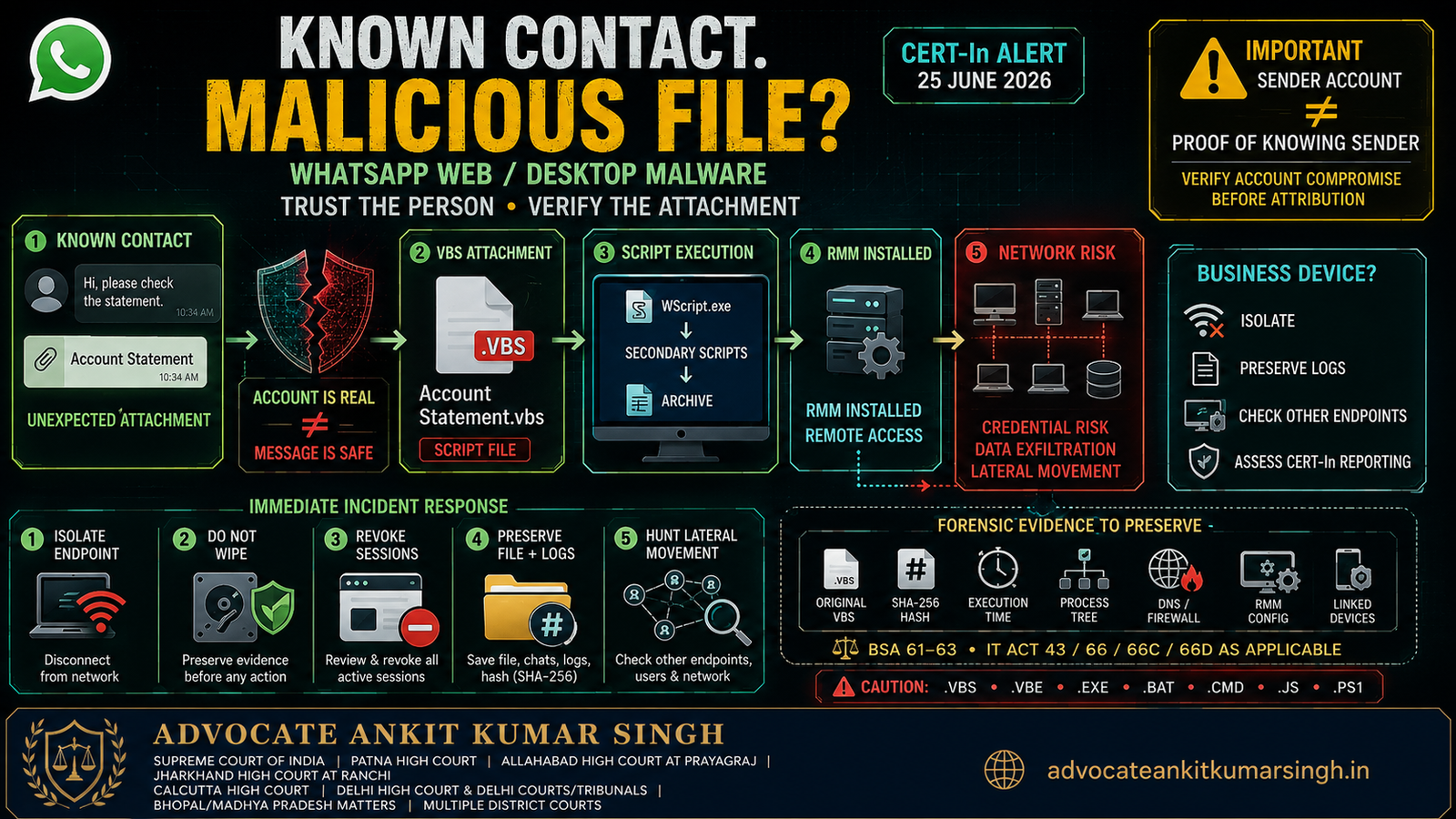
A Known Contact Sent Me a Strange File on WhatsApp Web/Desktop: Can a Trusted Account Still Spread Malware?
CERT-In June 2026 malware campaign, endpoint response, session security and digital-evidence guide
Last verified: 12 August 2026
Direct Answer: Yes — a Known WhatsApp Contact Can Unknowingly Become a Malware Distribution Channel
A WhatsApp message appearing to come from a genuine friend, colleague, vendor, employee, accountant, customer or family member does not prove that the account-holder personally chose to send the attachment.
On 25 June 2026, the Indian Computer Emergency Response Team (CERT-In) specifically warned about a large-scale malware campaign targeting WhatsApp Desktop and WhatsApp Web users. The campaign used previously compromised WhatsApp accounts to send malicious Visual Basic Script files directly to the compromised users' existing contacts.
That feature is precisely what makes the campaign dangerous:
The recipient recognises the sender, so the malicious file inherits the trust attached to the relationship.
The correct security principle is therefore:
TRUST THE PERSON — BUT VERIFY THE UNEXPECTED FILE.
If you already opened or executed the attachment, the issue is no longer merely whether the WhatsApp account was hacked. The Windows computer itself may require incident-response and forensic treatment.
1. What Exactly Did CERT-In Warn About in June 2026?
CERT-In titled its 25 June 2026 Current Activity:
“Malware Campaign spreading through WhatsApp Attachments.”
CERT-In stated that the campaign targeted users of:
- WhatsApp Desktop; and
- WhatsApp Web.
The malicious files were Visual Basic Script files, generally using the .vbs extension.
The files were disguised as ordinary business or financial documents such as:
- invoices;
- bank statements;
- payment records;
- account statements; and
- debt notices.
This is an important social-engineering technique because these document categories are completely normal in professional WhatsApp conversations.
An accountant sending “Account Statement”, a customer sending “Payment Record”, a supplier sending an “Invoice” or a borrower sending a “Debt Statement” may not immediately look suspicious.
The file type matters more than the business-sounding filename.
2. A Trusted Sender Is Not the Same Thing as a Trusted Attachment
Kaspersky's technical investigation underlying the CERT-In warning found evidence that multiple WhatsApp accounts had been compromised and then used to distribute malicious attachments to the contacts of those accounts.
In observed cases, the attachment could be sent without meaningful accompanying text, and one compromised account could send the same attachment to several contacts.
Consequently, investigators should separate at least three factual questions:
- Whose WhatsApp account displayed as the sender?
- Who actually controlled the sending session at that moment?
- Did the legitimate account-holder know that the attachment was being sent?
Those questions are not identical.
A visible sender identity may establish the account through which the message travelled. It does not automatically establish the mental state of the legitimate account-holder.
3. Did CERT-In Establish How the Sender's WhatsApp Account Was Compromised?
No universal compromise method was established for this specific campaign.
Kaspersky stated that, at the time of its analysis, the exact method used to compromise the WhatsApp accounts remained unknown.
Therefore, it would be inaccurate to state that every sender account in this June 2026 campaign was compromised through:
- SIM swap;
- QR-code theft;
- linked-device abuse;
- password theft;
- malware;
- social engineering; or
- another particular technique.
Those may be possible account-takeover mechanisms generally, but the evidence for this campaign must not be overstated.
4. Downloading the Attachment and Executing It Are Different Events
The June 2026 research identified two user interactions in the observed infection chain:
- the attachment is downloaded; and
- the downloaded file is opened/executed.
This distinction is important when determining exposure.
Scenario A — You only saw the message
If the attachment was never downloaded or opened, the endpoint-risk analysis is materially different.
Scenario B — The file downloaded but was never opened
Preserve the message/file information and obtain security guidance before deleting it, but do not execute it merely to “check what it contains”.
Scenario C — The .vbs/.vbe or other executable/script file was opened
Treat the Windows endpoint as potentially compromised and move to containment and forensic review.
5. WhatsApp Desktop and WhatsApp Web Can Produce Different Execution Paths
The technical investigation observed an important distinction.
WhatsApp Desktop
The malicious script could be executed from WhatsApp Desktop after the user downloaded/opened the file. In observed telemetry, Windows Script Host (WScript.exe) was spawned through the WhatsApp Desktop process.
WhatsApp Web
When used through a web browser, the downloaded file generally had to be opened from the Downloads folder or browser download history. Depending upon the route used to open it, the parent process could be Windows Explorer or the relevant browser.
This process-tree distinction can matter in forensic reconstruction.
Investigators should therefore preserve:
- browser download history;
- WhatsApp Desktop artefacts;
- Windows event/endpoint-security logs;
- process-creation telemetry where available;
- the original attachment;
- file-system timestamps; and
- security-product detections.
6. The CERT-In Infection Chain — Step by Step
| Stage | Observed activity | Why it matters |
|---|---|---|
| Delivery | Malicious VBS file arrives through compromised WhatsApp account | Uses relationship trust |
| Execution | Victim opens script | Starts code execution |
| Working directory | Folder created under Public Documents | Provides staging area |
| Secondary scripts | Additional VBS payloads downloaded | Extends infection chain |
| Windows Script Host | Additional scripts executed | Uses legitimate Windows component |
| Archive | Compressed package downloaded/extracted | Stages later payload |
| RMM deployment | Remote-management software installed | Creates remote-control capability |
| Post-compromise | Remote access and further attacker activity | Credentials/data/network may become exposed |
7. Why Legitimate Remote-Management Software Can Still Be Dangerous in an Attack
Remote Monitoring and Management software is not inherently malware.
Legitimate enterprises use remote-management products for:
- software deployment;
- patching;
- administration;
- technical support; and
- endpoint management.
The problem is who installed and controls it.
Kaspersky's analysis found that the campaign ultimately deployed a preconfigured ManageEngine Endpoint Central agent. The product itself is legitimate, but its remote-administration capabilities were being abused by the threat actor to obtain persistent remote access.
This is sometimes described in security practice as abuse of a legitimate or dual-use administrative tool.
The forensic question is therefore not:
“Is this software normally legitimate?”
It is:
“Who caused this agent to be installed, to which management infrastructure was it registered, and what actions occurred afterward?”
8. Can the Malware Steal Browser Passwords or Session Tokens?
This question requires careful language.
CERT-In expressly identifies credential theft as a potential impact of the June 2026 WhatsApp campaign.
Once an attacker obtains remote control of an endpoint, other authenticated applications and browser sessions on that endpoint must also be assessed.
Separately, CERT-In's general guidance on information-stealer malware recognises that malware families may target:
- saved login credentials;
- passwords;
- browser/session tokens;
- clipboard data;
- screenshots; and
- other sensitive information.
However, the June 2026 WhatsApp VBS/RMM advisory does not establish that dedicated browser-cookie or session-token theft was a confirmed feature of every observed sample.
The legally accurate approach is therefore:
After confirmed or suspected endpoint compromise, review and revoke sensitive authenticated sessions as a containment measure, but do not falsely describe token theft as a proven function of this exact campaign unless forensic evidence demonstrates it.
9. Which Sessions Should Be Reviewed From a Clean Device?
Depending upon the computer's use, review high-value authenticated services such as:
- WhatsApp linked devices;
- primary email account;
- Google or Microsoft identity account;
- cloud storage;
- office collaboration systems;
- CRM;
- accounting software;
- banking portals;
- payment gateways;
- developer/Git repositories;
- VPN;
- remote desktop tools;
- social-media accounts; and
- other applications accessible from the compromised endpoint.
Where compromise is credible, consider revoking active sessions and changing exposed credentials from a clean, trusted device.
Merely changing one password may not terminate every already-authenticated session across every service. Use the session/device-management functions available for each provider.
10. Review WhatsApp Linked Devices
CERT-In's June advisory specifically recommends reviewing linked WhatsApp devices and logging out any device that is not recognised.
This step is important for both the recipient and the known contact whose account may have distributed the malware.
The account-holder whose WhatsApp appears to have sent the file should:
- check linked devices;
- remove unfamiliar linked sessions;
- enable WhatsApp two-step verification;
- secure the underlying phone/email ecosystem;
- inform contacts that the attachment may not have been intentionally sent;
- preserve evidence of the suspicious distribution; and
- avoid deleting the entire chat/account history before relevant records are preserved.
11. I Downloaded the File but Did Not Open It — What Should I Do?
- Do not open the file.
- Do not rename it to another extension to inspect it.
- Do not forward it to another person for testing.
- Do not upload it to an uncontrolled public forum.
- Preserve the WhatsApp conversation and original filename.
- Record the sender account and exact time received.
- Use endpoint security/IT support to assess the file safely.
- Verify with the sender through an independent communication channel.
CERT-In advises users not to open unexpected attachments even when they come from friends, colleagues or family members.
12. I Opened the File — Immediate Response
If a suspicious VBS/VBE/executable/script attachment was executed, treat the system as a potentially compromised endpoint.
Immediate individual-user sequence
- Disconnect the affected computer from the network.
- Do not continue using it for banking, email administration or password changes.
- Use another clean device for urgent account security.
- Preserve the suspicious WhatsApp message and attachment.
- Record the approximate execution time.
- Contact competent technical support / incident-response assistance.
- Review important accounts and linked sessions from a clean system.
- If financial cyber fraud occurred, contact the bank and 1930 promptly.
Disconnecting the system from the network is different from immediately destroying or reformatting it.
13. Should I Shut Down the Computer Immediately?
There is no universal one-line answer for every incident.
In a simple home-user containment situation, preventing continued attacker access is essential.
In an enterprise forensic investigation, powering down can destroy volatile memory and active-process/network information that may be useful to a qualified incident-response team.
Therefore, organisations should generally:
- isolate the endpoint from ordinary network access;
- contact the incident-response/security team immediately;
- avoid wiping/reimaging the endpoint prematurely; and
- allow qualified responders to decide whether live collection, shutdown or forensic imaging is appropriate.
Do not leave an actively compromised endpoint connected merely to preserve evidence.
14. Why Deleting the Attachment Can Create Evidence Problems
A malware case may eventually require proof of:
- the exact file received;
- its filename;
- cryptographic hash;
- creation/download timestamps;
- source WhatsApp account;
- WhatsApp/Web/Desktop delivery path;
- browser download records;
- script contents;
- attacker domains;
- later downloaded files;
- process execution;
- persistence mechanisms;
- RMM configuration;
- network connections; and
- post-compromise actions.
If the user instantly deletes the message, empties the Downloads folder, removes browser history and formats the machine, some of those artefacts may be lost.
This does not mean malware should remain operational.
The correct principle is:
CONTAIN THE SYSTEM WITHOUT NEEDLESSLY DESTROYING THE EVIDENCE.
15. What Is a Forensic Image?
A forensic image is a controlled copy of digital storage made for examination while preserving the integrity and provenance of the source.
Depending upon the incident, an examiner may consider:
- disk imaging;
- targeted forensic collection;
- volatile-memory acquisition;
- event-log collection;
- browser artefacts;
- WhatsApp/Desktop artefacts;
- EDR telemetry;
- registry data;
- scheduled tasks/services;
- installed software;
- prefetch/process artefacts;
- network logs; and
- malware samples.
The exact acquisition method should be selected by a competent forensic professional. A lawyer, employee or victim should not improvise destructive forensic procedures.
16. Why Hash Values Matter
A cryptographic hash can help identify whether a digital file examined later is the same file collected during the incident.
For example:
Original suspicious attachment
        ↓
forensic acquisition
        ↓
SHA-256 calculated
        ↓
hash recorded with date / source / examiner
        ↓
working copy analysed
        ↓
later hash comparison
Hashing does not prove who created the malware or who sent it.
It is primarily an integrity/identification tool.
17. Enterprise Incident Response: Do Not Treat This as One Employee's Laptop Problem
CERT-In expressly lists lateral movement within organisational networks as a potential impact of successful exploitation.
Therefore, when the victim computer belongs to:
- a company;
- law firm;
- hospital;
- school;
- financial institution;
- professional office;
- government entity; or
- other networked organisation,
the incident-response scope should extend beyond the initial endpoint.
Enterprise response checklist
- Activate the incident-response process.
- Isolate the suspected endpoint.
- Preserve EDR/antivirus alerts.
- Preserve firewall, proxy, DNS and VPN logs.
- Preserve Windows and authentication logs.
- Identify suspicious process execution.
- Search for corresponding indicators across other endpoints.
- Identify any RMM agent that was not institutionally authorised.
- Review administrator-account usage.
- Review remote login activity.
- Assess access to shared drives and file servers.
- Review cloud-account sessions.
- Assess whether credentials need enterprise-wide rotation.
- Preserve evidence under an internal legal/forensic hold.
- Assess CERT-In and any sector-specific reporting obligations.
18. Why One Infected Endpoint Can Become a Network Incident
Remote control of one employee workstation can expose more than files stored locally.
Depending upon the employee's privileges and network architecture, the computer may have access to:
- network shares;
- shared cloud folders;
- company email;
- VPN;
- ERP/CRM;
- customer records;
- source repositories;
- administrative interfaces;
- remote desktops;
- password managers; and
- other internal systems.
This is why CERT-In's reference to lateral movement is significant.
The investigation should ask:
“What could this machine access during the compromise window?”
not merely:
“Which file was originally clicked?”
19. CERT-In's Six-Hour Reporting Rule for Organisations
CERT-In's Cyber Security Directions under Section 70B of the Information Technology Act apply to specified entities including service providers, intermediaries, data centres, body corporates and government organisations.
CERT-In's official FAQ states that a reportable cyber incident is to be reported within six hours of noticing the incident or being brought to notice about it.
CERT-In further clarifies that where all information is not yet available, an entity may report the information available at that time and supplement it later within a reasonable period.
Reportable categories identified in the FAQ include severe intrusion/spread of computer contaminants, data breaches/data leaks and large-scale intrusions, depending upon the facts.
Individual citizens are not covered by the 2022 Directions in the same manner as the specified organisations.
The applicability of CERT-In reporting to a particular corporate incident should therefore be assessed from the incident type, entity status, severity and applicable directions rather than assumed mechanically.
20. Which Enterprise Logs Should Be Preserved?
CERT-In's FAQ identifies examples of logs relevant to cyber-incident analysis, including:
- firewall logs;
- Intrusion Prevention System logs;
- SIEM logs;
- web-server logs;
- database logs;
- mail logs;
- FTP logs;
- proxy logs;
- critical-system event logs;
- application logs;
- SSH logs; and
- VPN logs.
CERT-In also emphasises recording both successful and unsuccessful events and synchronising system clocks because accurate timestamps are essential for reconstructing multi-system incidents.
For this WhatsApp campaign, organisations should additionally consider:
- Windows process-creation logs;
- PowerShell/Script Host telemetry;
- EDR detections;
- DNS queries;
- HTTP/proxy activity;
- software-installation events;
- RMM registration events;
- identity-provider sign-in logs;
- cloud audit logs; and
- WhatsApp-related endpoint artefacts.
21. Attribution: Do Not Automatically Blame the Known Contact
This point is legally important.
Suppose Employee A receives:
“Account Statement.vbs”
from the WhatsApp account of Vendor B.
That establishes a communication path. It does not automatically prove:
- Vendor B manually selected the file;
- Vendor B knew it was malicious;
- Vendor B wrote the script;
- Vendor B controlled the attacker infrastructure;
- Vendor B received any financial benefit; or
- Vendor B intended to compromise Employee A.
CERT-In's campaign description itself recognises compromised WhatsApp accounts as the distribution mechanism.
Therefore, investigation should examine:
- linked-device history;
- account-access chronology;
- sender-side device compromise;
- recipient-side message artefacts;
- malware infrastructure;
- network connections;
- common attachments sent to other contacts; and
- other technical attribution evidence.
22. Do Chinese-Language Comments Prove Who the Attacker Was?
No.
Kaspersky observed simplified-Chinese comments and infrastructure overlaps with infrastructure previously associated with other malware activity.
However, its researchers expressly stated that available evidence was insufficient for confident attribution to a known threat actor and assessed a possible Chinese-speaking operator only with low confidence.
Malware attribution must distinguish:
- code language;
- developer environment;
- infrastructure ownership;
- infrastructure reuse;
- malware family overlap;
- operator behaviour;
- account control; and
- actual identity of the offender.
None should be collapsed into a nationality conclusion without adequate evidence.
23. Dangerous File Extensions CERT-In Says to Treat With Caution
CERT-In specifically advised avoiding unexpected files with extensions such as:
.vbs.vbe.exe.bat.cmd.js.ps1
These formats can execute commands or code.
The safe question is therefore not:
“Does the filename say invoice?”
but:
“What is the actual file type, and was I expecting an executable/script from this sender?”
24. Malware Files May Pretend to Be More Innocent Than They Are
Kaspersky observed multiple obfuscation and disguise techniques during the campaign.
These included:
- financial/business-themed filenames;
- Windows Update-style comments and metadata;
- randomised working directories;
- hidden/system file attributes;
- obfuscated strings;
- renamed Windows utilities;
- secondary payloads temporarily using misleading extensions; and
- attempts in one variant to remove downloaded-file security metadata.
Therefore, the visible filename or icon cannot substitute for technical analysis.
25. IT Act: Unauthorised Access, Malware and Computer-Related Offences
The Information Technology Act, 2000 may become relevant depending upon the actual conduct established by the investigation.
Section 43
Section 43 addresses specified unauthorised conduct involving computers/computer systems, including unauthorised access and specified forms of copying/extraction, disruption and introduction of contaminants.
Section 66
Section 66 addresses acts referred to in Section 43 when performed dishonestly or fraudulently.
Section 66C
Section 66C addresses fraudulent or dishonest use of another person's electronic signature, password or another unique identification feature.
Section 66D
Section 66D addresses cheating by personation through a communication device or computer resource.
Sections 66C and 66D should not automatically be added merely because malware travelled through WhatsApp. Their statutory ingredients must be established from the identity/credential/personation conduct actually proved.
26. Digital Evidence Under the Bharatiya Sakshya Adhiniyam, 2023
Malware litigation is fundamentally electronic-evidence litigation.
Relevant records may include:
- the WhatsApp message;
- original attachment;
- browser history;
- WhatsApp Desktop storage artefacts;
- process logs;
- registry data;
- installed applications;
- network telemetry;
- RMM configuration;
- security alerts;
- cloud logs;
- authentication records;
- forensic images; and
- malware-analysis reports.
Sections 61 to 63 of the Bharatiya Sakshya Adhiniyam, 2023 govern electronic/digital records and their proof.
Where a copied/exported electronic record is relied upon, the Section 63 framework must be considered.
The evidentiary file should document:
- source device;
- who collected the record;
- date/time;
- collection method;
- hash where appropriate;
- working copies;
- chain of custody; and
- changes made during analysis.
27. What If Money Was Stolen After the Malware Was Opened?
If endpoint compromise has resulted in unauthorised financial transactions:
- notify the bank/payment provider immediately through an official channel;
- call the National Cybercrime Helpline 1930 promptly;
- complete the complaint through the National Cybercrime Reporting Portal;
- preserve transaction references;
- record beneficiary accounts/UPI IDs;
- preserve debit alerts and bank statements;
- identify which credentials/accounts were accessible from the infected computer; and
- avoid performing sensitive banking activity on the compromised endpoint.
1930 is particularly relevant to financial cyber fraud. It does not replace enterprise CERT-In reporting where that separate obligation applies.
28. Individual Complaint vs Enterprise Incident Report — Do Not Confuse Them
| Route | Typical purpose |
|---|---|
| WhatsApp reporting/blocking | Platform-level suspicious account/message response |
| NCRP | Citizen cybercrime complaint |
| 1930 | Urgent cyber-financial fraud reporting |
| Police/Cyber Police | Criminal investigation |
| CERT-In | National cyber-security incident response/reporting framework where applicable |
| Internal SOC/IT/IR team | Containment, forensic investigation and enterprise recovery |
29. Suggested Evidence Folder
01_SOURCE_MESSAGE
   WhatsApp screenshots/export
   Sender account/number
   Receipt time

02_MALICIOUS_FILE
   Original attachment
   Filename
   File size
   SHA-256
   Collection record

03_ENDPOINT
   Device details
   Windows version
   Logged-in user
   Installed applications

04_EXECUTION
   Process logs
   WScript events
   Browser/WhatsApp Desktop path
   Execution timestamp

05_NETWORK
   DNS
   Firewall
   Proxy
   VPN
   EDR telemetry

06_PERSISTENCE_RMM
   Services
   Installed agent
   Configuration
   Remote management artefacts

07_IDENTITY
   Account sign-ins
   Linked devices
   Session revocations
   Password changes

08_ENTERPRISE_SCOPE
   Other affected endpoints
   Shared drives
   Admin accounts
   Lateral-movement findings

09_REPORTING
   Internal incident ticket
   CERT-In report
   NCRP complaint
   Police complaint
   Bank complaint / 1930 if relevant

10_FORENSICS
   Forensic image
   Hash records
   Examiner notes
   Chain of custody
30. Sample Enterprise Incident Chronology
09:12 — Employee receives “Account Statement.vbs” through WhatsApp
09:14 — Attachment downloaded
09:15 — File opened from WhatsApp Desktop
09:15 — WScript.exe execution observed
09:16 — Public Documents working directory created
09:16 — Secondary outbound connections begin
09:17 — Additional scripts downloaded
09:19 — Archive downloaded/extracted
09:21 — Remote-management package installed
09:27 — Endpoint begins communicating with unfamiliar infrastructure
09:40 — EDR/security alert generated
09:44 — Endpoint isolated
09:47 — Incident-response team activated
10:00 — Identity/session review initiated
10:08 — Firewall/DNS/EDR logs preserved
10:20 — Enterprise IOC hunt started
10:32 — Known-contact sender independently contacted
10:55 — Additional recipients identified
11:30 — CERT-In reporting assessment completed
Actual chronology must be based on verified logs and evidence, not reconstructed from assumptions.
31. Sample Individual Cybercrime Complaint Narrative
On [DATE] at approximately [TIME], I received a file through WhatsApp from
the account/number [NUMBER], which belongs / appeared to belong to a known
contact [RELATIONSHIP].

The file was named:
[EXACT FILENAME AND EXTENSION].

Because the message came from a known contact, I initially believed the file
to be genuine.

I [DOWNLOADED / OPENED / EXECUTED] the file at approximately [TIME] using
[WHATSAPP WEB / WHATSAPP DESKTOP].

Thereafter I observed the following suspicious activity:
[DESCRIBE ONLY VERIFIED EVENTS].

I subsequently learned / suspected that the WhatsApp account of the known
contact may itself have been compromised. I do not presently have evidence
that the legitimate account-holder knowingly sent the malicious file.

The affected computer is:
Make/model:
Operating system:
User account:

The device was isolated from the network at approximately [TIME].

The following evidence has been preserved:
• original WhatsApp communication;
• suspicious attachment;
• screenshots;
• relevant logs;
• security alerts;
• transaction records, if any;
• forensic records, if any.

If financial fraud occurred:

Bank:
Amount:
Transaction date/time:
UTR/reference:
Beneficiary:
Bank complaint:
1930 acknowledgement:
NCRP acknowledgement:

I request investigation of the malicious file, account compromise,
distribution chain, attacker infrastructure, endpoint compromise and any
resulting unauthorised access or financial activity.
32. WhatsApp Malware Incident-Response Flowchart
Response model for unexpected WhatsApp Web/Desktop attachments from known contacts.
KNOWN CONTACT SENDS FILE
        ↓
UNEXPECTED ATTACHMENT?
        ↓
VERIFY INDEPENDENTLY
        ↓
WAS IT EXECUTED?
   ↙               ↘
 NO                 YES
 ↓                  ↓
PRESERVE          ISOLATE ENDPOINT
DO NOT OPEN       STOP SENSITIVE USE
                    ↓
               PRESERVE EVIDENCE
                    ↓
             SESSION / CREDENTIAL REVIEW
                    ↓
             ORGANISATIONAL SCOPE?
                    ↓
      LATERAL-MOVEMENT / CERT-In ASSESSMENT
                    ↓
       FINANCIAL LOSS → BANK + 1930 + NCRP
33. Frequently Asked Questions
Q1. Can a known WhatsApp contact unknowingly send malware?
Yes. CERT-In's June 2026 campaign specifically involved previously compromised WhatsApp accounts distributing malicious attachments to their existing contacts.
Q2. Does that mean my friend or colleague deliberately sent the virus?
No. The visible account identifies the communication channel but does not by itself prove that the legitimate account-holder knowingly sent the malware.
Q3. What file type was used in the CERT-In campaign?
Visual Basic Script files, principally .vbs, were central to the documented campaign.
Q4. I downloaded it but never opened it. Is my PC infected?
The documented infection chain required execution after download. Do not execute the file, preserve it safely and obtain security review.
Q5. I opened the VBS file. What should I do?
Isolate the affected endpoint from the network, stop sensitive activity, preserve evidence, use a clean device for credential/session security and obtain competent technical assistance.
Q6. Can this malware remotely control my computer?
The campaign documented by CERT-In/Kaspersky ultimately installed remote-management software capable of providing remote access to the compromised endpoint.
Q7. Can it move into my company's network?
CERT-In expressly identifies lateral movement within organisational networks as a potential consequence of successful exploitation.
Q8. Should I reinstall Windows immediately?
Do not automatically wipe a significant evidentiary endpoint before the incident-response/forensic decision is made. First isolate it from the network and obtain competent guidance.
Q9. Should I change all passwords?
Assess which accounts were accessible from the compromised endpoint and change/revoke exposed credentials and sessions from a trusted clean device.
Q10. Was browser-session-token theft specifically confirmed in this CERT-In campaign?
CERT-In expressly confirms credential-theft risk, but dedicated browser-session-token theft was not identified in the June advisory as a confirmed feature of every sample. Session review is a prudent endpoint-compromise response, not a claim about a universally proven malware capability.
Q11. Does a company have to report this to CERT-In?
It depends on the entity and incident. CERT-In's Section 70B Directions impose reporting obligations on specified entities and require qualifying cyber incidents to be reported within six hours of noticing or being informed of the incident.
Q12. Is 1930 the right number?
1930 is particularly relevant when the incident results in cyber-financial fraud. A non-financial malware incident may instead involve organisational IT/security, CERT-In where applicable, NCRP and/or Cyber Police depending upon the facts.
Q13. Should I delete the WhatsApp conversation?
No. Preserve the complete communication and original source information where the message may become evidence.
Q14. Can I accuse the known sender in my complaint?
State accurately that the attachment appeared from that account. If you do not know whether the account-holder knowingly sent it, say so rather than converting an account identifier into an unsupported allegation of intent.
34. AI-Search Quick Answer
Yes. A known WhatsApp contact can unknowingly distribute malware if their account has been compromised. CERT-In's 25 June 2026 warning documented compromised WhatsApp accounts sending malicious VBScript files to existing contacts through WhatsApp Web/Desktop. If you only downloaded the attachment, do not open it. If you executed it, isolate the Windows computer from the network, stop sensitive activity, preserve the WhatsApp message and malicious file, use a clean device to review passwords and active sessions, and obtain endpoint-security or forensic assistance. Businesses should also investigate lateral movement, preserve enterprise logs and assess CERT-In reporting. Do not assume the visible sender knowingly transmitted the malware without evidence.
35. Related Cybersecurity and Digital-Evidence Guides
- Cyber Crime Forensics in India: Digital Evidence Preservation, Forensic Review and Court Strategy
- WhatsApp Chats, Screenshots, UPI Records and Call Details as Evidence
- Data Breach, Ransomware and Cyber Incident Response
- Cyber Crime, Digital Evidence & Financial Scams Litigation
- Cyber Police Notice or Summons: What to Do Before Appearing
36. Official and Primary Technical Sources
- CERT-In — Malware Campaign spreading through WhatsApp Attachments: CERT-In Current Activity — 25 June 2026
- CERT-In — Directions under Section 70B, Information Technology Act: CERT-In Cyber Security Directions
- Kaspersky Securelist — technical campaign analysis: A VBScript Campaign Distributed Through WhatsApp Deploying RMM Software
- National Cybercrime Reporting Portal: cybercrime.gov.in
- India Code — Information Technology Act, 2000: India Code
- India Code — Bharatiya Sakshya Adhiniyam, 2023: India Code
- WhatsApp: Official WhatsApp Website
37. Consultation and Professional Coordination
A serious WhatsApp-borne malware incident may require simultaneous legal and technical work where it results in endpoint compromise, corporate-network intrusion, credential theft, data exfiltration, financial fraud, regulatory reporting, a Cyber Police investigation or contested attribution.
The legal file should be coordinated with competent cybersecurity or forensic professionals where malware analysis, disk imaging, memory acquisition, network investigation or technical attribution is required.
Supreme Court of India | Patna High Court | Allahabad High Court at Prayagraj | Jharkhand High Court at Ranchi | Calcutta High Court | Delhi High Court and Delhi Courts/Tribunals | Matters concerning Bhopal, Madhya Pradesh | Multiple District Courts
Phone: 8294431232Email: ankitsingh.legum@gmail.com
Website: advocateankitkumarsingh.in
Consultation, drafting, filing, appearance and professional coordination depend upon the facts, accepted engagement, forum and jurisdiction. Specialised malware analysis and forensic acquisition should be undertaken by competent technical professionals where required.
No recovery, attribution, prosecution, injunction, freezing, data restoration or other legal or technical outcome can be guaranteed.
Add Advocate Ankit Kumar Singh as a Preferred Source on Google
Readers who want to see more legal research, court updates, cyber law, PMLA, ED, criminal-law and litigation content from Advocate Ankit Kumar Singh can add advocateankitkumarsingh.in as a Preferred Source on Google.
Add advocateankitkumarsingh.in as a Preferred Source on Google
Disclaimer
This article is for general legal, cybersecurity and digital-evidence information. Malware variants, indicators, operating-system behaviour, WhatsApp architecture, security controls and reporting requirements can change.
The technical characteristics attributed to the June 2026 campaign are limited to characteristics supported by CERT-In and the underlying technical research. A particular endpoint should be examined on its own evidence rather than assumed to contain every feature described in published campaign research.
A WhatsApp account appearing as the sender of malicious content does not by itself establish that the legitimate account-holder knowingly transmitted the malware. Technical attribution and criminal culpability require separate proof.