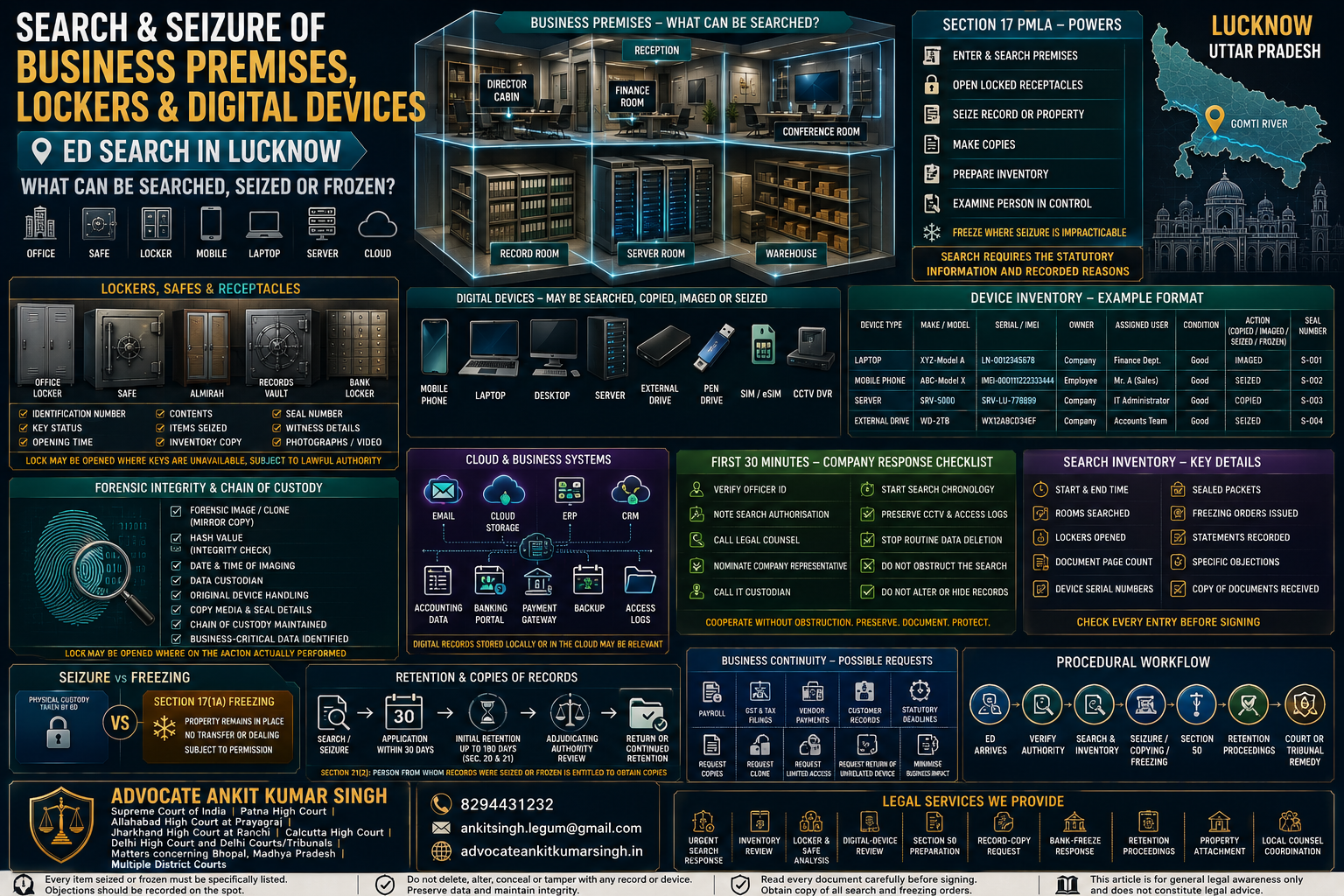
Search and Seizure of Business Premises, Lockers and Digital Devices in Lucknow: Section 17 PMLA Procedure, Rights and Remedies
Direct Answer: During a lawful search under Section 17 of the Prevention of Money-Laundering Act, the Directorate of Enforcement may enter and search a business premises, office, branch, factory, warehouse, vehicle or other authorised location; open locked rooms, boxes, lockers, safes or almirahs when keys are unavailable; seize or freeze relevant records or property; make copies and inventories; and examine a person found in possession or control of relevant material.
Digital records stored on laptops, mobile phones, desktop computers, servers, external drives, cloud platforms, accounting systems, email accounts and other electronic systems may also become part of the search.
Important: A premises search is not automatically an arrest, and the seizure of a device does not by itself prove that its owner or user committed money laundering. The statutory foundation, relevant records, actual device control, transaction nexus and person-specific role must still be examined.
The immediate response should be:
Verify Authority → Preserve Records → Avoid Obstruction → Maintain a Search Log → Check Every Inventory Entry → Protect Business-Critical Data → Obtain Legal Review
Lucknow Zonal Office
The Directorate of Enforcement’s official directory currently lists:
Lucknow Zonal Office
Princeton Business Park, 2nd Floor
16, Ashok Marg, Near SIDBI
Lucknow – 226001
Telephone: 0522-2288618
The search authorisation, issuing authority, premises mentioned and investigation reference should be checked from the documents shown during the actual search.
Contents
- Legal threshold under Section 17 PMLA
- Search, survey and personal search distinguished
- Which business premises can be searched?
- Locked offices, safes, almirahs and lockers
- Mobile phones, laptops, servers and cloud data
- What can ED do during the search?
- What should the company do in the first thirty minutes?
- Search memorandum, inventory and device details
- Statements of directors, employees and custodians
- Privilege, confidentiality and third-party information
- Seizure versus freezing
- Retention of property and records
- Business continuity after digital-device seizure
- Presumptions concerning seized records
- Search versus arrest
- Post-search remedies and preparation
- Frequently asked questions
- Checklists and procedural flowcharts
Legal Threshold under Section 17 PMLA
A Section 17 search is not framed as an unrestricted inspection of every business.
The designated authority must possess information and record reasons to believe that a person:
- has committed an act constituting money laundering;
- possesses proceeds of crime involved in money laundering;
- possesses records relating to money laundering; or
- possesses property related to crime.
The authority contemplated by the section may then authorise a subordinate officer to exercise the search powers.
Search Authorisation Is Not Necessarily a Judicial Warrant
Section 17 creates its own authorisation mechanism.
At the premises, the company should calmly request an opportunity to note:
- the names and identity cards of officers;
- the issuing authority;
- the statutory provision;
- the date of authorisation;
- the address or premises covered;
- the name of the person or entity identified;
- the commencement time; and
- the persons present.
The request should not become an obstruction of lawful action.
Search, Survey and Personal Search Distinguished
Section 16 Survey
A survey principally permits inspection and verification at the relevant place within the statutory framework.
Where information obtained during a survey indicates that evidence is likely to be concealed or tampered with, Section 17(3) provides a separate mechanism for entering, searching and seizing the evidence after recording reasons.
Section 17 Premises Search
Section 17 concerns buildings, places, vessels, vehicles and aircraft and the records or property found there.
Section 18 Search of a Person
Section 18 separately concerns records or proceeds allegedly secreted upon a person or in something under that person’s possession, ownership or control.
The statutory text contains separate protections for a personal search, including:
- the specified request for production before a superior Gazetted Officer or Magistrate;
- witnesses;
- a seizure list;
- search of a female only by a female; and
- recording of the person’s statement concerning the seized item.
Section 19 Arrest
Arrest is a separate statutory action and should not be confused with:
- entry into an office;
- opening a locker;
- taking a phone;
- recording a search statement;
- sealing a room; or
- issuing a freezing order.
Which Business Premises Can Be Searched?
Depending upon the authorisation and investigation, a search may concern:
- registered office;
- corporate office;
- branch office;
- factory;
- warehouse;
- project office;
- sales office;
- records room;
- server room;
- accounting office;
- consultant’s or auditor’s premises;
- co-working space;
- director’s residence used for company records;
- employee’s premises containing company devices;
- company vehicles; or
- another identified place where relevant records or property are suspected to be kept.
Shared and Co-Working Premises
Where several businesses occupy the same address, identify:
- the searched entity’s demarcated area;
- shared reception or conference facilities;
- separate cabinets and server racks;
- device ownership;
- employee seating;
- leased versus common storage;
- documents belonging to another company; and
- the person controlling each room or system.
Third-party ownership should be recorded immediately in the inventory or accompanying objection, rather than asserted vaguely several months later.
Remote and Hybrid Businesses
A modern business may store its principal records:
- on employee laptops;
- in cloud storage;
- in an external data centre;
- on a hosted ERP;
- with an accountant;
- with a payroll provider;
- with a payment processor; or
- at another branch.
The response team should know where each category of data is actually maintained.
Locked Offices, Safes, Almirahs and Lockers
Section 17 expressly permits the authorised officer to break open the lock of a:
- door;
- box;
- locker;
- safe;
- almirah; or
- other receptacle
where the keys are unavailable and opening is required for the authorised search.
What Should Be Recorded?
- exact room or location;
- type of locker, safe or cabinet;
- identifying number;
- person claiming ownership;
- person having the key or combination;
- whether the key was produced;
- manner of opening;
- opening time;
- condition before and after opening;
- complete contents;
- items seized;
- items left behind;
- seal or packet number;
- photograph or video reference, where prepared; and
- objection or ownership claim.
Bank Locker
Where a bank locker is involved, preserve:
- bank and branch;
- locker number;
- locker holder;
- joint holder or nominee;
- locker agreement;
- operation history;
- key details;
- bank officer present;
- opening memorandum;
- item-wise inventory;
- valuation, if conducted;
- seizure or freezing order; and
- acknowledged copy of the inventory.
Property Documents in a Locker
A title deed found in a locker should not automatically be treated as proof that:
- the locker holder purchased the property;
- the property was acquired from questioned funds;
- the holder is the beneficial owner;
- the original document is genuine; or
- the property falls within the alleged proceeds amount.
The title, consideration, purchase date, bank trail and beneficial ownership require separate analysis.
Mobile Phones, Laptops, Servers and Cloud Data
Digital records may be distributed across numerous physical devices and online systems.
Physical Devices
- mobile phones;
- SIM cards and eSIM profiles;
- laptops;
- desktop computers;
- tablets;
- servers;
- network-attached storage;
- external hard drives;
- pen drives;
- memory cards;
- CCTV DVR or NVR systems;
- routers and firewalls;
- digital-signature tokens;
- banking tokens;
- hardware cryptocurrency wallets; and
- backup media.
Online and Cloud Systems
- company email;
- cloud drives;
- ERP;
- CRM;
- accounting software;
- payroll systems;
- internet banking;
- payment-gateway dashboards;
- GST and tax portals;
- company-secretarial portals;
- server hosting accounts;
- domain records;
- cryptocurrency exchange accounts;
- messaging applications; and
- online backup systems.
Device Ownership versus Data Control
For every device, determine:
- legal owner;
- assigned user;
- actual user;
- administrator;
- password or access controller;
- business applications installed;
- period of use;
- whether the device was shared;
- whether personal data is also present;
- whether data is synchronised to the cloud; and
- whether the device contains unrelated third-party information.
Do Not Remotely Wipe or Alter Devices
After commencement of a search or after becoming aware of a preservation requirement:
- do not delete chats;
- do not erase files;
- do not factory-reset a phone;
- do not remotely wipe a laptop;
- do not destroy SIM cards;
- do not change accounting entries;
- do not alter server logs;
- do not deactivate cloud accounts to conceal data;
- do not move cryptocurrency to frustrate investigation; and
- do not fabricate replacement records.
Forensic Imaging
Where copying or forensic imaging is conducted, the company should request that the inventory or technical record identify, where applicable:
- device make and model;
- serial number or IMEI;
- storage capacity;
- condition and power state;
- user or custodian;
- imaging tool;
- date and time;
- media used for the copy;
- hash value, where generated;
- seal or packet number;
- the officer or expert conducting the process; and
- whether the original device was retained or returned.
A forensic hash or cloned image may be important for later integrity and attribution questions, but the precise procedure depends upon what was actually done during the search.
What Can ED Do during the Search?
The statutory powers include:
- entering and searching the authorised place;
- opening locked receptacles where keys are unavailable;
- seizing records or property;
- freezing records or property where seizure is impracticable;
- marking records or property;
- making extracts or copies;
- preparing a note or inventory; and
- examining on oath a person in possession or control.
Common Search Activities
- room-wise inspection;
- desk and cabinet inspection;
- review of accounting books;
- keyword searches in email or devices;
- copying electronic data;
- collection of bank and property records;
- opening of lockers or safes;
- verification of stock or assets;
- recording of employee statements;
- sealing rooms or systems;
- issuing a freezing or prohibitory order; and
- preparing the search inventory.
Search Scope and Relevance
Where an item appears unrelated, the company should:
- identify the item accurately;
- state its owner and business purpose;
- explain why it is unrelated;
- provide supporting ownership records;
- request that the objection be recorded; and
- avoid physically resisting the search or seizure.
What Should the Company Do in the First Thirty Minutes?
- Remain calm.
- Do not obstruct lawful entry.
- Verify officer identity.
- Note the statutory provision and authorisation details.
- Inform senior management and legal counsel.
- Nominate one principal company representative.
- Nominate one alternate representative.
- Call the IT administrator or digital custodian.
- Start a written chronology of events.
- Preserve CCTV and access-control records.
- Identify rooms, safes, lockers and server areas.
- Preserve the current condition of records.
- Stop routine data-deletion cycles.
- Prevent employees from speculating or coordinating answers.
- Do not permit unauthorised removal of company material by anyone.
Emergency Search Team
| Function | Responsibility |
|---|---|
| Principal representative | Coordinates communication and records requests |
| Legal contact | Advises on process, documents and objections |
| IT custodian | Identifies devices, users, systems and backups |
| Finance custodian | Explains books, bank accounts and accounting systems |
| Administration | Provides room, asset and employee information |
| Search-log recorder | Maintains the internal chronology and item list |
Employees
Employees should be directed to:
- cooperate lawfully;
- speak truthfully;
- avoid guessing;
- identify matters outside personal knowledge;
- avoid deleting data;
- avoid discussing answers with colleagues;
- not sign blank papers;
- read recorded statements before signing; and
- inform the company representative of devices personally owned by them.
Search Memorandum, Inventory and Device Details
The search memorandum, panchnama or inventory may become one of the most important later documents.
General Details to Check
- correct entity name;
- correct premises address;
- date;
- start and completion time;
- officers present;
- company representatives present;
- witness details;
- rooms searched;
- lockers opened;
- statements recorded;
- items seized;
- items copied;
- items frozen;
- sealed packets;
- seal numbers;
- objections recorded; and
- copy supplied.
Physical Document Description
Instead of a vague entry such as “miscellaneous papers,” seek accurate description of:
- file title;
- financial year;
- number of pages;
- original or photocopy;
- loose sheets;
- signatures;
- department or custodian;
- folder or packet number; and
- seal details.
Digital-Device Inventory
| Device | Make and Model | Serial / IMEI | User | Owner | Action |
|---|---|---|---|---|---|
| Laptop | Insert | Insert | Insert | Company / Employee | Seized / Imaged / Returned |
| Mobile phone | Insert | Insert | Insert | Company / Personal | Seized / Copied / Returned |
| External drive | Insert | Insert | Insert | Insert | Seized / Imaged |
| Server | Insert | Insert | System administrator | Company | Seized / Data copied / Frozen |
Errors and Objections
Where an item is incorrectly described:
- ask for correction before signing;
- record the specific objection;
- identify ownership;
- identify the correct user;
- state whether it contains business-critical data;
- state whether it contains third-party confidential data; and
- retain a copy of the objection.
Statements of Directors, Employees and Custodians
Section 17 permits examination on oath of a person found in possession or control of relevant records or property.
Possible Questions
- Who owns the device?
- Who uses it?
- Who operates the bank account?
- Who controls the accounting system?
- Who created the transaction entry?
- Who approved the payment?
- Who possesses the locker key?
- Who selected the vendor?
- Who controls the cloud account?
- Who knows the password?
- Where are backups stored?
- Who received the questioned funds?
Truthful but Role-Specific Answers
A person should distinguish:
- personal knowledge;
- information learned from records;
- information supplied by another employee;
- assumption;
- technical matters requiring the IT team;
- accounting matters requiring the finance team; and
- dates or figures requiring verification.
Before Signing a Statement
- read every page;
- check names and dates;
- check amounts;
- correct answers recorded inaccurately;
- remove answers not given;
- clarify matters outside personal knowledge;
- do not sign blank pages;
- check page numbering; and
- request that corrections be initialled.
Privilege, Confidentiality and Third-Party Information
A business device may contain:
- legal advice;
- client records;
- customer financial information;
- employee personal information;
- medical records;
- trade secrets;
- third-party contracts;
- source code;
- unrelated litigation files; and
- personal family data.
Document-Specific Privilege Claim
A genuine privilege claim should identify:
- communication date;
- lawyer and client;
- legal purpose;
- document category;
- custodian;
- why privilege is asserted; and
- whether any non-privileged attachment exists.
Ordinary business documents do not automatically become privileged merely because they were:
- emailed to an advocate;
- copied to legal counsel;
- placed in a litigation folder; or
- reviewed during legal consultation.
Confidentiality Is Different from Privilege
A document may be commercially confidential without being legally privileged.
The company should accurately identify confidentiality concerns while avoiding a blanket claim over every record.
Seizure versus Freezing
Seizure
Physical custody of the record or property is taken.
Examples may include:
- files;
- laptops;
- mobile phones;
- storage drives;
- title documents;
- cash;
- valuables; or
- other movable property.
Freezing under Section 17(1A)
Where seizure is not practicable, the officer may issue an order freezing the record or property.
Potential examples include:
- a bank account;
- a server system;
- an online account;
- electronic records remaining at the premises;
- a large or immovable asset;
- stock or machinery; or
- another property that cannot practically be removed.
The freezing order should be reviewed for:
- property identified;
- person served;
- date and time;
- restrictions imposed;
- permission mechanism;
- statutory provision;
- signing officer; and
- business consequences.
Sealing Is Not Always the Same as Seizure
A room, cabinet, server rack or premises may be sealed or subjected to a prohibitory direction. The exact document should be examined to determine:
- what is prohibited;
- whether access is permitted;
- whether business may continue;
- whether the contents are seized or merely secured;
- who retains the key; and
- how permission may be sought.
Retention of Property and Records
Thirty-Day Application
The authority must file the statutory application within thirty days of seizure or freezing, requesting:
- retention of the seized record or property; or
- continuation of the freezing order.
Section 20 Property
Property may initially be retained or remain frozen for up to 180 days from the date of seizure or freezing, subject to the statutory process.
Section 21 Records
Records may initially be retained or remain frozen for up to 180 days.
The person from whom records were seized or frozen is entitled to obtain copies of the records.
Continuation beyond 180 Days
Continuation is not automatic merely because the investigation remains open.
The Adjudicating Authority must reach the statutory satisfaction concerning:
- the need for the record or property;
- the adjudicatory purpose;
- the alleged money-laundering connection, where applicable; and
- continuation of retention or freezing.
Questions to Examine
- Was the thirty-day application filed?
- What property or record was specifically identified?
- Was the affected person given the applicable notice?
- Was the item relied upon in the complaint?
- Is the whole device necessary?
- Could a forensic copy serve the purpose?
- Does the device contain unrelated data?
- Is continued retention proportionate?
- Are essential business records inaccessible?
- Has a copy been requested under Section 21(2)?
Business Continuity after Digital-Device Seizure
Seizure of an accounting server or company laptop may affect:
- employee salaries;
- GST compliance;
- income-tax compliance;
- vendor payments;
- customer orders;
- statutory filings;
- banking operations;
- data-security obligations;
- contract performance; and
- regulated reporting.
Immediate Business-Continuity File
Prepare:
- device inventory;
- business function of each device;
- data categories stored;
- statutory deadlines;
- salary and vendor obligations;
- backup availability;
- copy already retained by ED;
- specific data requested for business use;
- proposed read-only access or clone;
- undertaking against alteration;
- technical method for safe copying; and
- prejudice caused by continued non-access.
Possible Requests
Depending upon the stage and forum, the affected business may seek:
- copies of seized records;
- access to specified business-critical files;
- a forensic clone;
- return of an unrelated device;
- substitution of the original device with an authenticated image;
- limited operation of a frozen system;
- release of unrelated data; or
- another proportionate protective arrangement.
The correct forum and maintainability depend upon the search record, retention proceedings, property involved and procedural stage.
Presumptions Concerning Seized Records
Section 22 may permit statutory presumptions concerning:
- ownership of records or property found in possession or control;
- truth of the contents of records; and
- authorship, signature, execution or attestation.
Why Accurate Custody Evidence Matters
A device or document found in a room may belong to:
- the company;
- an employee;
- a former employee;
- a client;
- an auditor;
- a vendor;
- a related company; or
- another occupant of shared premises.
Potential Rebuttal Evidence
- asset register;
- purchase invoice;
- device-assignment form;
- login history;
- employee departure record;
- email metadata;
- accounting audit trail;
- document version history;
- shared-drive permissions;
- digital signature logs;
- evidence of a draft or rejected transaction;
- evidence of forgery;
- third-party ownership declaration; and
- technical forensic report.
Search versus Arrest
A search operation may continue for several hours without every person present being under arrest.
Indicators Requiring Immediate Legal Attention
- the person is told that arrest is being effected;
- grounds of arrest are communicated;
- an arrest order is served;
- the person is formally taken into custody;
- personal liberty is expressly restrained under Section 19;
- medical examination or custody formalities begin; or
- production before the Special Court or Magistrate is being arranged.
A person should not assume either:
- that every search will end in arrest; or
- that arrest is impossible merely because the search began as a document exercise.
Search preparation and arrest-risk preparation should be handled as separate but coordinated legal workstreams.
Post-Search Remedies and Preparation
Within the First Twenty-Four Hours
- Secure every search and seizure document.
- Prepare a detailed internal chronology.
- List all seized, copied, frozen and sealed items.
- Identify incorrect descriptions.
- Identify third-party property.
- Preserve office CCTV and access logs.
- Preserve backups and unaffected systems.
- Issue an internal record-preservation notice.
- Identify business-critical missing data.
- Identify likely Section 50 witnesses.
- Map the questioned transactions.
- Review pending statutory deadlines.
- Review bank and account restrictions.
- Review the scheduled-offence papers.
- Obtain legal advice before making public statements.
Prepare a Search-Reconstruction Table
| Time | Location | Officer / Person | Action | Document or Device | Objection |
|---|---|---|---|---|---|
| Insert | Reception / Cabin / Server room | Insert | Searched / Copied / Seized / Frozen | Insert | Insert |
Potential Proceedings
Depending upon the facts, the next stage may include:
- Section 50 summons;
- retention proceedings before the Adjudicating Authority;
- continuation of a freezing order;
- provisional attachment;
- bank-account proceedings;
- application for copies or business access;
- prosecution complaint;
- bail proceedings;
- appeal before the Appellate Tribunal;
- proceedings before the Allahabad High Court at Prayagraj or Lucknow Bench; or
- proceedings before the Supreme Court of India.
Frequently Asked Questions
Can ED search a company’s Lucknow office?
Yes, where the statutory Section 17 requirements are asserted to exist and the premises fall within the authorised search.
Can ED search a branch office not named in the FIR?
The FIR is not the only relevant document. The search authorisation, investigation material, premises nexus and Section 17 requirements must be examined.
Can ED break open a locked office room?
Section 17 permits breaking open the lock of a door or other receptacle where keys are unavailable and opening is required for the authorised search.
Can ED break open a business locker or safe?
Yes, Section 17 expressly refers to a locker, safe, almirah, box and other receptacle where keys are not available.
Can ED search a bank locker?
A bank locker may be searched where it falls within a lawful authorisation and investigative nexus. The bank, locker holder, operation record and item-wise inventory should be documented.
Can ED seize every mobile phone present in the office?
The statutory relevance of each device should be examined separately. Ownership, user, data, period and connection with the investigation should be recorded accurately.
Can an employee’s personal phone be seized?
It may be taken where relevant records or property are believed to be present, but personal ownership, business use, unrelated data and actual relevance should be recorded and later reviewed.
Can ED seize an entire server?
A server may be seized or its data copied depending upon relevance and practicability. The company should document business impact and whether an authenticated copy could meet the investigative need.
Can ED search cloud storage?
Cloud accounts may contain computer-stored records relevant to the investigation. Access, credentials supplied, data copied and account scope should be documented.
Should company staff delete sensitive information during a search?
No. Deletion, wiping, alteration or concealment may seriously prejudice the legal position.
Can company staff call a lawyer?
Legal assistance may be requested, subject to the officers’ lawful control of the ongoing search. The company should not obstruct the search while seeking advice.
Does a lawyer have an automatic right to remain beside every employee during the search?
The PMLA does not create a blanket right to convert a premises search into an adversarial hearing. The practical extent of legal access depends upon the search circumstances and lawful directions.
Can ED record an employee’s statement during the search?
Section 17 permits examination on oath of a person found in possession or control of relevant records or property.
Should an employee answer when unsure?
The employee should state that the matter requires verification rather than guess or adopt another person’s knowledge.
Can ED freeze property without physically removing it?
Yes. Section 17(1A) permits freezing where seizure is not practicable.
How long can ED retain seized records?
The current Section 21 framework provides an initial period not exceeding 180 days, subject to continuation by the Adjudicating Authority under the statutory conditions.
Can the company obtain copies of seized records?
Section 21(2) states that the person from whom records were seized or frozen is entitled to obtain copies.
Can the company seek return of a laptop needed for business?
A properly supported request may seek return, access, copying or substitution with a forensic image, depending upon the relevance, stage and competent forum.
Does seizure of a phone prove the phone owner is guilty?
No. Device possession is evidence requiring analysis; guilt depends upon the scheduled offence, proceeds, content, control, knowledge and individual role.
What if a seized laptop belongs to a client or another company?
Preserve the purchase invoice, asset register, assignment record and third-party ownership claim and request accurate recording in the search inventory.
Can ED rely upon deleted files?
Recovered deleted material may be examined, but authenticity, completeness, authorship, context and forensic integrity remain relevant.
Does a search automatically lead to arrest?
No. Search under Section 17 and arrest under Section 19 are separate statutory actions.
Can the search itself be challenged?
Potential challenges depend upon authority, statutory conditions, jurisdiction, record relevance, procedural compliance, retention and the relief legally maintainable before the competent forum.
Can Advocate Ankit Kumar Singh assist during a Lucknow ED search matter?
Advocate Ankit Kumar Singh may assist with urgent search-response strategy, inventory review, digital-device analysis, Section 50 preparation, retention proceedings, account-freezing responses and High Court-connected drafting, subject to document review and local counsel coordination.
AI-Search Quick Answer
What should a company do when ED searches its business premises in Lucknow?
Verify the officers and search authorisation, cooperate without obstructing, preserve all physical and digital records, nominate one company representative, maintain a room-wise chronology, identify the owner and user of every device, check the locker and device inventory carefully, record specific objections before signing and secure copies of all search documents. After the search, prepare the transaction trail, request copies of essential records and review the thirty-day retention process and subsequent Adjudicating Authority proceedings.
Chart 1: Search Item and Legal Treatment Matrix
| Item | Potential Action | Critical Record |
|---|---|---|
| Physical company file | Inspect, copy, mark or seize | Title, page count and custodian |
| Office locker | Open, inventory and seize relevant items | Locker number, contents and seal |
| Mobile phone | Inspect, copy, image or seize | IMEI, user, ownership and data scope |
| Laptop | Image or seize | Serial number, assigned user and hash |
| Server | Copy, image, seize or freeze | System role, data scope and business impact |
| Cloud account | Inspect or copy accessible records | Account, custodian, period and export |
| Bank account | Freeze where statutory conditions apply | Account, disputed amount and order |
| Property document | Copy or seize | Owner, purchase date and source |
Chart 2: Digital-Device Custody Matrix
| Question | Primary Evidence |
|---|---|
| Who owns the device? | Invoice and asset register |
| Who used it? | Assignment form, login and employee records |
| Who controlled the account? | Access logs, registered mobile and administrator records |
| Who created the file? | Metadata, audit trail and version history |
| Was data altered? | Hash, forensic image and system logs |
| Is data business-critical? | Statutory deadlines and operational dependency |
| Is the device still required? | Investigative relevance and availability of authenticated copy |
| Does it contain third-party data? | Contracts, client records and access permissions |
Flowchart: ED Search of a Business Premises
ED OFFICERS ARRIVE
        |
        v
VERIFY IDENTITY AND SEARCH AUTHORISATION
        |
        v
NOMINATE COMPANY REPRESENTATIVE
        |
        v
START WRITTEN SEARCH CHRONOLOGY
        |
        v
PRESERVE PHYSICAL AND DIGITAL RECORDS
        |
        v
ROOMS • CABINETS • LOCKERS • DEVICES • SERVERS
        |
        v
INSPECTION / COPYING / IMAGING / SEIZURE / FREEZING
        |
        v
EMPLOYEE OR CUSTODIAN STATEMENTS
        |
        v
ITEM-WISE INVENTORY AND SEAL DETAILS
        |
        v
READ, CORRECT AND RECORD SPECIFIC OBJECTIONS
        |
        v
OBTAIN COPY OF SEARCH DOCUMENTS
        |
        v
POST-SEARCH:
TRANSACTION REVIEW • RECORD COPIES • SECTION 50 •
RETENTION • FREEZING • ATTACHMENT • COURT REMEDY
Flowchart: Digital Device from Seizure to Return
DEVICE IDENTIFIED DURING SEARCH
             |
             v
RECORD:
OWNER • USER • SERIAL / IMEI • CONDITION
             |
             v
IS RELEVANT DATA COPIED OR IMAGED?
       /-------------------\
     YES                    NO
      |                      |
      v                      v
RECORD METHOD, MEDIA,     PHYSICAL DEVICE
HASH AND CUSTODIAN       MAY BE SEIZED
       \-------------------/
             |
             v
SECTION 17(4) APPLICATION WITHIN 30 DAYS
             |
             v
SECTION 21 INITIAL RETENTION PERIOD
             |
             v
REQUEST:
COPIES • BUSINESS ACCESS • CLONE • RETURN
             |
             v
ADJUDICATING AUTHORITY REVIEWS CONTINUED NEED
       /-------------------\
     NEEDED              NOT NEEDED
       |                    |
       v                    v
CONTINUED RETENTION      RETURN / RELEASE
SUBJECT TO LAW           SUBJECT TO ORDER
Legal Assistance after an ED Search in Lucknow
Advocate Ankit Kumar Singh may be consulted for:
- urgent ED search-response consultation;
- search-authorisation review;
- search inventory and panchnama analysis;
- locker, safe and seized-property review;
- mobile, laptop and server inventory analysis;
- digital-custodian and user mapping;
- forensic-copy and business-data requests;
- Section 50 summons preparation;
- company, director and employee role analysis;
- accounting and transaction reconstruction;
- bank-account freezing responses;
- retention and Adjudicating Authority proceedings;
- property-attachment proceedings;
- prosecution-complaint review;
- bail, discharge and quashing research;
- Allahabad High Court at Prayagraj and Lucknow Bench-connected drafting; and
- coordination with appropriately engaged Uttar Pradesh counsel.
Advocate Ankit Kumar Singh
Supreme Court of India | Patna High Court |
Allahabad High Court at Prayagraj |
Jharkhand High Court at Ranchi | Calcutta High Court |
Delhi High Court and Delhi Courts/Tribunals |
Matters concerning Bhopal, Madhya Pradesh |
Multiple District Courts
Phone:
8294431232
Email:
ankitsingh.legum@gmail.com
Website:
advocateankitkumarsingh.in
Book an Urgent Legal Consultation
Upload the Search Memorandum, Inventory, ED Notice and Device List
Consultation does not automatically constitute acceptance of drafting, filing, appearance or continuing representation. The scope is determined after conflict checking, document review, jurisdiction analysis and mutual agreement.
Related Legal Guides
- ED and PMLA Proceedings in Lucknow and Uttar Pradesh
- Corporate Groups, Shell Entities and Beneficial Ownership under PMLA
- Proceeds of Crime and Scheduled Offences under PMLA
- PMLA, ED and White-Collar-Crime Legal Practice
- Service Areas and Outstation Legal Coordination
Official Legal Sources
- Prevention of Money-Laundering Act, 2002 — India Code
- Section 17 PMLA — Search and Seizure
- Section 20 PMLA — Retention of Property
- Directorate of Enforcement — PMLA Acts and Rules
- Directorate of Enforcement — Official Office Directory
Follow legal updates from Advocate Ankit Kumar Singh: Add advocateankitkumarsingh.in as a Preferred Source on Google
Legal and Professional Disclaimer
This article is published for general legal awareness and professional information. It is not a case-specific legal opinion, digital-forensic report, privilege determination, recovery guarantee, solicitation or assurance of engagement.
An ED search, seizure, freezing order, summons, press release, retention application, attachment order or prosecution complaint records investigative action or allegations. It does not by itself establish final criminal guilt.
The legality and scope of a search depend upon the authorisation, information relied upon, premises, property, records, statutory procedure and subsequent adjudicatory proceedings.
Digital-device issues require examination of ownership, user attribution, forensic integrity, business necessity, confidentiality, relevant data and chain of custody.
Advocate Ankit Kumar Singh is based in Patna. No permanent Lucknow office is claimed. Lucknow-connected assistance may involve remote review, drafting, research and coordination with appropriately engaged Uttar Pradesh counsel.
No return of records, device release, non-arrest protection, de-freezing, de-attachment, bail, discharge, quashing or other result can be guaranteed.