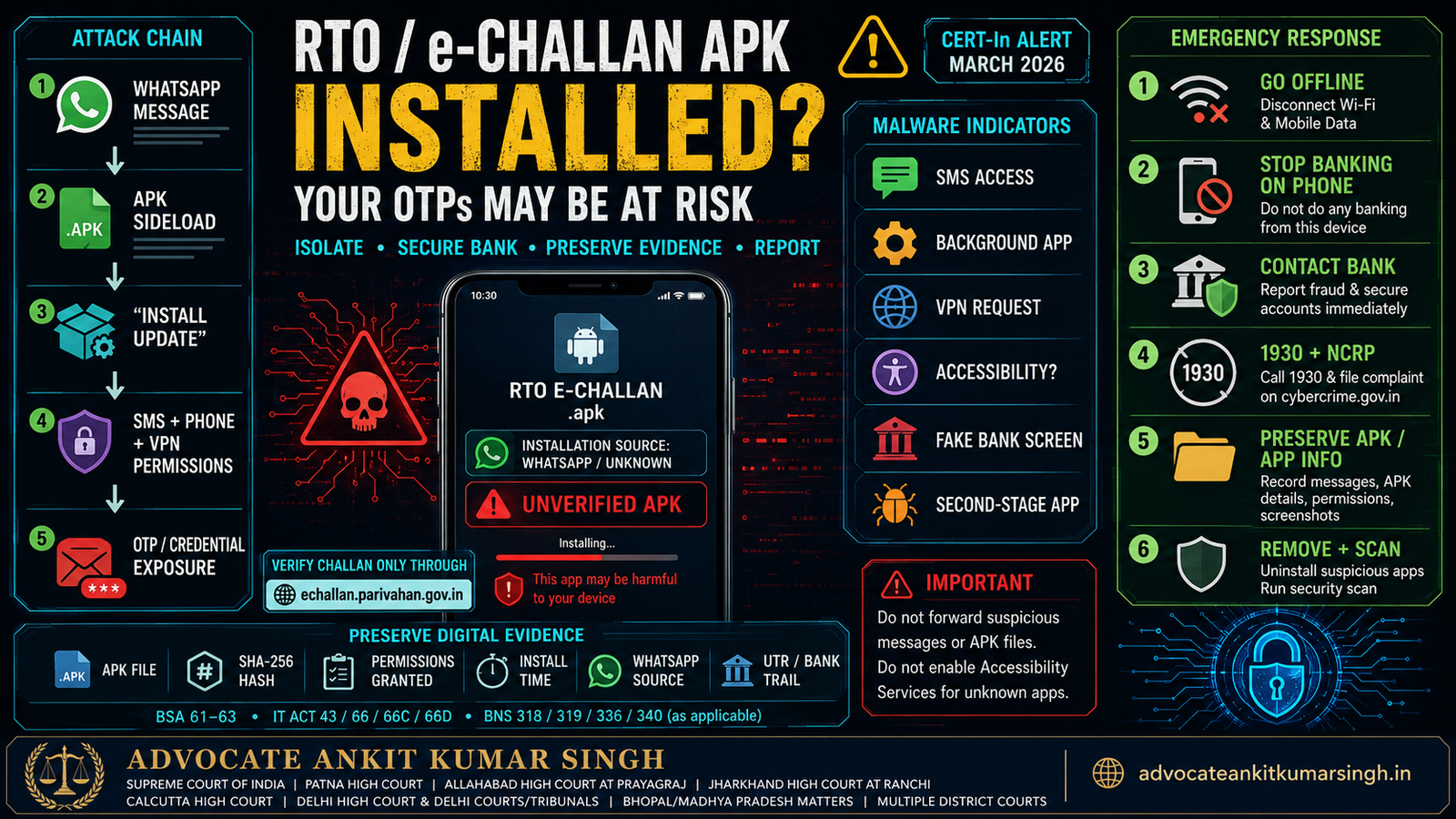
I Installed an RTO or e-Challan APK From WhatsApp: Can It Steal Bank OTPs?
Immediate cyber-safety, banking-protection and digital-evidence guide — India 2026
Last verified: 12 August 2026
Direct Answer: Yes — a Fake RTO/e-Challan APK Can Potentially Intercept Bank OTPs
If you installed an Android APK received through WhatsApp, SMS, Telegram or an unknown website claiming to be an RTO challan, e-Challan or mParivahan application, treat the device as potentially compromised.
This is not a theoretical warning. On 17 March 2026, the Indian Computer Emergency Response Team (CERT-In) issued a specific alert concerning a sophisticated RTO/e-Challan-themed Android malware campaign targeting users across India.
CERT-In reported malicious applications using names such as:
- RTO Challan.apk;
- RTO E Challan.apk;
- MParivahan.apk; and
- similar deceptive variants.
According to CERT-In, the malicious application could function as a multi-stage dropper, seek SMS and phone-call permissions, run in the background, request permission to establish a VPN connection, display fake financial screens to collect credentials and, after obtaining SMS access, send OTP messages to an attacker-controlled server.
Therefore, if such an APK was actually installed, do not analyse the event merely as a suspicious WhatsApp message. The correct assumption until the phone is assessed is:
THE DEVICE MAY HAVE BEEN COMPROMISED.
1. First Five Minutes: What Should You Do Immediately?
- Disconnect the phone from mobile data and Wi-Fi.
- Do not perform banking transactions from the suspected device.
- Do not enter another OTP, UPI PIN, card PIN or internet-banking password on it.
- Do not reopen the fake e-Challan/RTO application.
- Use another trusted device to contact your bank through its official fraud channel.
- Review recent bank and UPI transactions.
- If an unauthorised financial transaction has occurred, immediately report it to the bank and Cybercrime Helpline 1930.
- Complete the cybercrime complaint at cybercrime.gov.in.
- Record basic evidence about the suspicious application before removal if this can be done safely without reconnecting or operating the malware.
- Then proceed with containment/removal consistent with CERT-In guidance.
Do not delay financial reporting because you are trying to conduct your own malware investigation.
If money is currently leaving the account, bank notification and financial containment are the priority.
2. What Is an APK?
APK is the application package format traditionally used to distribute/install Android applications.
Android allows applications to be installed from sources other than Google Play in appropriate circumstances. This practice is commonly called sideloading.
Sideloading is not inherently criminal or malicious. Businesses and developers may lawfully distribute applications outside Google Play.
The danger arises when an unexpected WhatsApp/SMS message convinces a user to install an unverified APK that falsely presents itself as:
- mParivahan;
- RTO Challan;
- Traffic Challan;
- e-Challan;
- VAHAN;
- vehicle fine receipt;
- RTO notice; or
- government transport update.
Google warns that applications obtained from unknown sources can put the device and personal information at risk. Google Play Protect is designed to check potentially harmful applications, including applications obtained outside Google Play.
3. The March 2026 CERT-In RTO/e-Challan Malware Campaign
CERT-In described a campaign beginning with messages resembling:
“Your vehicle challan has been generated, download the receipt from the link below.”
The message may contain either:
- an APK attachment; or
- a URL from which the APK can be downloaded.
The important technical point is that the visible application may not be the complete attack.
CERT-In reported that the first installed application could function as a dropper. When the victim tapped a purported “Install Update” function, the actual malicious payload could then be installed.
CERT-In further stated that the second malicious e-Challan-themed application may not appear normally in the phone's application list.
This creates a dangerous false assumption:
“I cannot see the fake app anymore, therefore the phone is clean.”
That conclusion is not safe.
4. How Can the Malware Steal an OTP?
An OTP does not have to be “broken” cryptographically for an attacker to obtain it.
If malicious software obtains access to incoming SMS messages, it may be able to read the OTP after the bank sends it to the phone.
CERT-In specifically reported that the RTO/e-Challan malware sought SMS permissions and that OTP messages could be sent to the attacker's server.
A simplified attack sequence is:
- Victim installs fake RTO/e-Challan APK.
- Malware obtains SMS or related dangerous permissions.
- Victim enters banking/card credentials into a fake screen or the attacker obtains credentials through another method.
- Bank generates an OTP.
- OTP arrives on victim's phone.
- Malware reads/intercepts the message.
- OTP information is transmitted to attacker-controlled infrastructure.
- Attacker attempts to complete the unauthorised transaction.
Therefore:
Possession of the phone is not enough protection if malicious software has obtained access to the authentication channel itself.
5. SMS Permission Is Not the Only Risk
A technically sound response should examine all dangerous privileges granted to the suspicious application.
Relevant indicators can include:
- SMS access;
- phone/call access;
- contacts permission;
- notification access;
- Accessibility Services;
- device-administrator privileges;
- display-over-other-apps permission;
- background execution;
- VPN permission;
- storage/file access;
- microphone or camera access;
- installation of unknown applications;
- automatic-start/background privileges; or
- battery-optimisation exemptions.
Not every version of the malware will necessarily request every permission.
The actual permission set on the affected phone matters.
6. Why Accessibility Permission Is Particularly Sensitive
Android Accessibility Services are legitimate and important features designed to assist users with disabilities.
But a malicious application that improperly obtains accessibility privileges can obtain extremely powerful interaction capabilities.
Google's Android guidance warns that accessibility access can allow an application to read content displayed on the screen and interact with applications on the user's behalf.
Therefore, an unverified “challan” application asking the user to:
- open Accessibility settings;
- enable restricted settings;
- allow the app to control the screen;
- allow notification reading; or
- grant unexplained administrative privileges
should be treated as a severe warning sign.
CERT-In expressly advises users never to enable Accessibility Services for unknown or unverified applications.
7. Why Did the Malware Ask to Create a VPN?
CERT-In reported that this campaign could seek permission to establish a VPN connection.
A VPN permission request from an alleged challan application is highly abnormal and requires immediate scrutiny.
CERT-In stated that this capability could allow the attacker to monitor internet traffic from the victim's device.
If you remember seeing an Android prompt asking whether the “e-Challan” or “mParivahan” application could create a VPN connection, record that fact in your chronology.
Also preserve, where safely possible:
- the application name shown in VPN settings;
- screenshots of VPN configuration;
- date/time;
- whether “always-on VPN” appeared;
- whether the VPN was active when transactions occurred; and
- any unusual persistent key/VPN indicator visible on the device.
8. “I Deleted the APK File.” Is the Malware Gone?
Not necessarily.
There is an important distinction between:
- deleting the downloaded .apk installation file; and
- uninstalling the installed application.
Deleting the APK from the Downloads or WhatsApp folder does not automatically uninstall software that has already been installed.
Further, CERT-In's campaign description involves a multi-stage dropper. The first-stage application and subsequently installed payload may not have the same visibility or behaviour.
Therefore, merely deleting:
RTO Challan.apk
from the Downloads directory is not a reliable remediation method.
9. Should I Uninstall It Immediately or Preserve Evidence First?
This requires a careful distinction between incident containment and evidence preservation.
CERT-In's specific public guidance for a user who already installed the malicious APK is to:
- disconnect mobile data/Wi-Fi;
- go to Settings → Applications;
- uninstall the e-Challan and other suspicious applications;
- run a trusted antivirus scan;
- change passwords/UPI PIN; and
- check bank statements for unauthorised transactions.
That is the appropriate public-safety baseline.
However, a serious financial-fraud case may also require proof of:
- which APK was received;
- its filename and file size;
- the WhatsApp/SMS source;
- the download URL;
- installation date and time;
- application package identity;
- permissions granted;
- whether Accessibility was enabled;
- whether VPN permission existed;
- what second-stage application appeared;
- the malware file's cryptographic hash;
- transactions occurring during the compromise period; and
- correlation between device compromise and financial loss.
Consequently, where safe and practical, the victim may first document readily available evidence while the device remains offline, and then proceed with removal.
This does not mean repeatedly opening the malware or reconnecting the phone merely to obtain screenshots.
If unauthorised transfers are continuing, financial containment overrides evidentiary perfection.
10. Minimum Evidence to Record Before Uninstallation — If Safe
Without reopening the suspicious application or reconnecting the infected device, record whatever is already safely visible:
- Name displayed for the application.
- Application icon.
- App-info screen.
- Storage size.
- Installation source, if displayed.
- Permissions currently granted.
- Accessibility Services status.
- Device Administrator status.
- Notification-access status.
- VPN configuration.
- “Install unknown apps” permission for WhatsApp/browser/file manager.
- Original WhatsApp/SMS message delivering the file.
- Filename of the APK.
- Download URL if one exists.
- Date/time of download and installation.
- Any Play Protect warning received.
- Any second “Install Update” screen remembered or documented.
In a high-value fraud case, a competent mobile-forensics examiner may be able to perform a more structured acquisition or examination.
11. Why the Original APK Can Matter as Evidence
The original malicious APK may help establish:
- the software actually delivered to the victim;
- its cryptographic hash;
- its requested permissions;
- embedded domains or network indicators;
- package name;
- signing information;
- application resources;
- malicious or suspicious functionality;
- linkage with other reported samples; and
- the relationship between the malware and the subsequent financial loss.
The Bharatiya Sakshya Adhiniyam, 2023 gives legal recognition to electronic and digital records. Its Section 63 framework and statutory certificate schedule specifically contemplate identification of digital-record sources and hash values.
A cryptographic hash such as SHA-256 can help document that a particular digital file has remained unchanged between collection and later examination.
Therefore, indiscriminately deleting:
- the WhatsApp chat;
- the APK;
- the download history;
- the application details; and
- all related artefacts
before any record is made can create avoidable proof difficulties.
Again, preservation must not come at the cost of leaving the phone online and exposed.
12. Banking Emergency: Treat the Compromised Phone as Untrusted
If the phone was used for mobile banking, UPI, cards, email or password recovery, security action should be taken from a different trusted device wherever possible.
Contact your bank immediately if:
- money has already been debited;
- unknown beneficiary registrations appear;
- UPI transactions occurred without your knowledge;
- you entered banking credentials into the suspicious application;
- you entered card details;
- you entered an internet-banking password;
- you received OTPs that you did not request;
- your banking application logged out unexpectedly;
- your UPI PIN was reset; or
- other suspicious account activity exists.
RBI's customer-protection framework emphasises prompt reporting of unauthorised electronic banking transactions. Upon receiving a report, banks are required to take immediate steps to prevent further unauthorised transactions.
Ask for an acknowledgement or complaint/reference number.
13. Banking-Session and Credential Revocation Checklist
The exact facilities differ between banks, UPI applications and account providers, but depending upon what was exposed, consider requesting or performing the following through official channels:
- block or temporarily restrict mobile banking;
- de-register the compromised handset where the bank provides that facility;
- block/restrict UPI if compromise is suspected;
- change the UPI PIN;
- change internet-banking password;
- change mobile-banking MPIN;
- block and replace card credentials if card information was entered;
- review beneficiaries/payees added recently;
- review mandates/autopay instructions;
- review recent login/session history if available;
- reduce transaction limits temporarily;
- enable transaction alerts;
- check linked mobile number/email details for unauthorised modification; and
- ask the bank about any additional compromise-control procedure specific to its application.
Do not perform sensitive credential changes on the infected device unless your bank or competent technical assistance determines that doing so is safe.
14. Secure the Email and Google Account Too
Banking security is not the only concern.
If the compromised Android phone contained:
- Gmail;
- saved passwords;
- bank emails;
- password-reset messages;
- Google Password Manager;
- personal documents; or
- identity records,
review the associated accounts from a trusted device.
Review Google Account security activity and signed-in devices. If an unfamiliar session/device is detected, sign it out and change the relevant password.
Also consider changing passwords for any important account whose credentials were typed into the compromised phone during the suspected period.
Use unique passwords rather than repeating one compromised password across several services.
15. What About the SIM?
If the malware merely read incoming SMS, replacing the SIM alone does not necessarily clean the compromised operating system.
Conversely, if there are signs of:
- unexpected loss of mobile network;
- SIM replacement;
- SIM/eSIM activation messages;
- OTP failures combined with loss of service;
- unknown telecom-account changes; or
- porting activity,
contact the telecom provider through its official channel immediately.
Malware compromise and SIM-swap fraud are different attack mechanisms, although a sophisticated fraud may involve more than one technique.
16. Malware Indicators to Look For
None of the following alone conclusively proves infection, but they may justify technical examination:
- an RTO/e-Challan/mParivahan APK received outside an official store;
- request to tap “Install Update” after the first installation;
- an app disappearing from the visible application drawer;
- SMS permission granted to a challan application;
- phone/call permission granted unnecessarily;
- VPN profile created unexpectedly;
- Accessibility Service enabled for an unknown app;
- notification access granted;
- “display over other apps” permission;
- unexpected background battery use;
- unusual mobile-data consumption;
- banking screens that look slightly different;
- unknown OTP requests;
- rapid unauthorised transactions;
- new applications with generic names/icons;
- Play Protect warning;
- device becoming difficult to control;
- security settings being changed without clear reason; or
- unknown VPN/key status indicator.
17. Run Google Play Protect — But Do Not Treat One Clean Scan as Conclusive Forensic Proof
Google Play Protect checks Android applications for harmful behaviour, including applications installed from sources outside Google Play. It may warn about, disable or remove potentially harmful applications.
CERT-In recommends keeping Google Play Protect enabled.
After initial containment, run Play Protect and an appropriate trusted security scan.
However:
A “no threats found” result should not automatically be treated as proof that the device was never compromised.
Detection depends upon the particular sample, signatures, behaviour, security product and device state.
Where substantial financial loss or litigation is involved, a forensic review may be more appropriate than relying exclusively upon one consumer antivirus result.
18. Should I Factory Reset the Phone?
A factory reset may eventually be part of remediation where compromise is suspected, but it should not be the first impulsive step in every evidentiary case.
A reset can destroy or materially alter:
- application artefacts;
- local logs;
- installation history;
- malware remnants;
- messages;
- downloads;
- configuration evidence;
- VPN settings;
- permission states; and
- other forensic material.
Therefore:
High-value fraud / disputed liability / likely criminal litigation → consider forensic preservation before reset.
Immediate consumer-security situation without evidentiary complexity → follow CERT-In/device-security remediation guidance promptly.
Do not reconnect a deliberately isolated compromised device merely to create more evidence.
19. If Money Has Already Been Debited: 1930 + Bank + NCRP
Financial cyber fraud should be reported quickly.
- Call the National Cybercrime Helpline 1930.
- Notify the concerned bank/payment provider using an official channel.
- Record the bank complaint/reference number.
- Preserve UTR/RRN/transaction references.
- Complete the complaint through the National Cybercrime Reporting Portal: cybercrime.gov.in.
- Preserve the 1930/NCRP acknowledgement.
I4C's Citizen Financial Cyber Fraud Reporting and Management System is intended to facilitate rapid reporting and coordination concerning cyber-financial fraud.
Prompt reporting may improve opportunities for financial intervention, but freezing or recovery cannot be guaranteed.
20. Evidence Checklist for the Cybercrime Complaint
| Evidence Category | What to Preserve |
|---|---|
| Original message | WhatsApp/SMS/Telegram message delivering the APK or link |
| Sender | Number, profile, username, SMS header |
| APK | Original file if safely available, filename, size, hash if forensically acquired |
| URL | Exact download link, shortened link and resolved destination if already known |
| Installation | Date/time, app name/icon, install source, “Install Update” step |
| Permissions | SMS, phone, accessibility, notification, VPN and other permission evidence |
| Banking | Statement, debit alert, beneficiary, UPI ID, UTR/RRN |
| Authentication | Unexpected OTPs, PIN-reset alerts, login alerts |
| Reporting | Bank complaint, 1930 acknowledgement, NCRP complaint |
| Device | Make/model, IMEI, Android version, security patch level |
| Chronology | Minute/hour-wise sequence from message to installation to financial loss |
21. Build a Precise Timeline
A useful chronology may look like this:
10:14 AM — WhatsApp message received from +91XXXXXXXXXX
10:16 AM — “RTO Challan.apk” downloaded
10:18 AM — APK installed
10:19 AM — App asked for SMS permission
10:20 AM — “Install Update” selected
10:22 AM — Second installation prompt completed
10:25 AM — VPN permission accepted
10:41 AM — Fake bank/payment screen appeared
10:43 AM — Card/net-banking information entered
10:44 AM — OTP received
10:45 AM — Unauthorised debit alert received
10:48 AM — Second debit
10:52 AM — Mobile data/Wi-Fi disconnected
10:56 AM — Bank fraud helpline contacted
11:02 AM — 1930 complaint initiated
11:18 AM — NCRP complaint completed
A chronology can help investigators correlate device events, bank transactions, messages and network activity.
22. IT Act: Unauthorised Computer Access and Data Extraction
The Information Technology Act, 2000 contains several provisions that may become relevant depending upon the precise malware behaviour.
Section 43
Section 43 addresses specified unauthorised acts involving a computer, computer system or computer network, including accessing systems without permission and downloading, copying or extracting data.
Section 66
Where acts referred to in Section 43 are performed dishonestly or fraudulently, Section 66 may require examination.
Section 66C — Identity Theft
This provision concerns fraudulent or dishonest use of another person's electronic signature, password or other unique identification feature.
Section 66D — Cheating by Personation Using Computer Resource
This provision may become relevant where the offender uses a communication device or computer resource to cheat by personation, for example by pretending that malicious software or communication is an official government/RTO facility.
These provisions must be applied to the actual proved conduct rather than inserted mechanically into every complaint.
23. BNS: Cheating, Personation and Fabricated e-Challan Material
Depending upon the evidence, the Bharatiya Nyaya Sanhita, 2023 may also become relevant.
| Conduct | Potential Legal Issue |
|---|---|
| Victim deceived into installing software or transferring money | BNS Section 318 — cheating, subject to ingredients |
| Fraudster pretends to represent RTO/government/another identity | BNS Section 319 — cheating by personation, depending upon facts |
| Fabricated challan/electronic document created | Forgery provisions, including Section 336, may require examination |
| Forged electronic challan/document knowingly used as genuine | BNS Section 340 may require examination |
The legal classification depends on the document, deception, intent, data accessed and financial transaction actually proved.
24. Electronic Evidence Under the Bharatiya Sakshya Adhiniyam
Sections 61 to 63 of the Bharatiya Sakshya Adhiniyam, 2023 provide the statutory framework concerning electronic/digital records and their proof.
Section 63's statutory certificate schedule specifically includes fields concerning:
- the device/digital-record source;
- make/model and device identifiers where applicable;
- IMEI/UIN/UID/MAC/cloud identifiers where relevant;
- hash values; and
- the algorithm used to produce the hash.
This makes digital-evidence discipline particularly important in malware cases.
For significant litigation, preserve:
- the original source where possible;
- forensic copies where professionally acquired;
- hash values;
- acquisition date/time;
- who handled the device/file;
- how the copy was created; and
- the relationship between the file and the victim's device.
25. Official e-Challan Verification: Do Not Use the WhatsApp Link
The official Ministry of Road Transport & Highways/NIC e-Challan portal is:
https://echallan.parivahan.gov.in/
The official portal itself currently carries an important warning about fraudulent websites and mobile applications impersonating e-Challan services.
It advises users to access the service only through the official website/application and states that it does not request passwords, OTPs, payment details or sensitive personal information through unsolicited calls, emails, messages or links.
Therefore, when checking whether a challan actually exists:
- do not reopen the suspicious WhatsApp link;
- open the official portal independently on a clean device;
- use the official challan-status facility;
- compare the actual official record with the message received; and
- preserve the fake message separately as evidence.
26. Do Not Forward the APK to Friends “For Checking”
CERT-In specifically advises users not to forward suspicious messages to friends or family.
This is important.
Do not:
- send the APK to another person's phone;
- install it on a spare phone casually;
- upload it publicly to social media;
- ask a family member to “open it and see what happens”; or
- re-execute it on the compromised device to capture a better screenshot.
Malware analysis should be conducted in an appropriate controlled environment by competent persons.
27. Emergency Decision Flow
Emergency response after installing a suspected RTO/e-Challan malware APK.
INSTALLED SUSPICIOUS APK
        ↓
DISCONNECT DATA + WI-FI
        ↓
STOP USING PHONE FOR BANKING
        ↓
MONEY LOST?
   ↙             ↘
 YES              NO
 ↓                ↓
BANK + 1930     REVIEW BANK/UPI
+ NCRP          + SECURE ACCOUNTS
   ↘             ↙
SAFELY PRESERVE KEY EVIDENCE
        ↓
UNINSTALL / SECURITY SCAN
        ↓
CHANGE CREDENTIALS FROM CLEAN DEVICE
        ↓
FORENSIC REVIEW IF LOSS / DISPUTE JUSTIFIES IT
28. Sample Cybercrime Complaint Narrative
On [DATE] at approximately [TIME], I received a WhatsApp/SMS message from
[NUMBER / ACCOUNT] purporting to relate to an RTO / traffic e-Challan.

The message contained / linked to an Android APK named:
[EXACT FILE NAME].

Believing the communication to be genuine, I downloaded and installed the APK
on my Android device:

Make/model:
Android version:
IMEI, if required:
Mobile number:

At approximately [TIME], the application requested the following permissions:
[SMS / PHONE / ACCESSIBILITY / VPN / NOTIFICATION / OTHER].

I also recall / recorded the following subsequent installation or “update”:
[DETAILS].

Thereafter, I observed:
[OTP MESSAGES / UNAUTHORISED DEBIT / BANK LOGIN / UNKNOWN TRANSACTION /
OTHER INDICATORS].

The following unauthorised transaction(s) occurred:

Date/time:
Amount:
Bank:
Beneficiary:
UPI ID/account:
UTR/RRN/reference:

I disconnected the affected device from mobile data/Wi-Fi at approximately
[TIME].

The incident was reported to:

Bank complaint/reference:
1930 acknowledgement:
NCRP acknowledgement:

I have preserved, to the extent available, the original message, APK/download
details, screenshots, application/permission information, OTP/debit alerts,
bank statement and transaction records.

I request investigation of the malicious application, sender infrastructure,
payment trail and other relevant electronic evidence, and appropriate action
under the applicable law.
The complaint should be adapted to the actual facts. Do not include permissions or events that did not actually occur.
29. Frequently Asked Questions
Q1. Can a fake e-Challan APK really read my bank OTP?
Yes, if the malicious application obtains the relevant SMS access. CERT-In's March 2026 alert specifically reported OTP messages being sent to attacker infrastructure after the malware obtained SMS permissions.
Q2. I installed MParivahan.apk from WhatsApp but did not enter banking details. Am I safe?
Do not assume so. Credential theft is one risk, but device permissions, SMS access, VPN capability, background execution or a second-stage payload may create additional exposure. Isolate and assess the device.
Q3. I deleted the APK from WhatsApp Downloads. Is that enough?
No. Deleting an installer file does not necessarily uninstall software that has already been installed, and CERT-In described a multi-stage malware chain.
Q4. The fake app is not visible in my app drawer. Does that mean it is gone?
No. CERT-In specifically reported that the malicious second-stage e-Challan application might not appear in the normal application list.
Q5. Should I immediately uninstall the app?
CERT-In recommends disconnecting data/Wi-Fi and uninstalling suspicious e-Challan applications. In a significant fraud case, safely document available evidence first if that can be done offline without operating the malware. Do not delay urgent banking action.
Q6. Should I factory reset immediately?
A reset may eventually be appropriate, but it can destroy evidence. Where substantial money is lost or criminal/forensic examination is likely, obtain appropriate technical guidance before wiping the device.
Q7. Should I change my UPI PIN?
CERT-In specifically recommends changing passwords/UPI PIN after installation of the malicious APK. Perform sensitive changes from a trusted device or official banking channel where the affected phone is considered compromised.
Q8. Should I call 1930 even though this began as malware?
If the incident has resulted in cyber-financial fraud, report it promptly through 1930 and complete the NCRP complaint.
Q9. Can Play Protect find the malware?
Google Play Protect checks applications for harmful behaviour and may warn, disable or remove potentially harmful applications. It is an important protection layer but should not be treated as the sole forensic method after a serious compromise.
Q10. Where should I verify a genuine traffic challan?
Use the official e-Challan portal at echallan.parivahan.gov.in or the appropriate official State traffic-police facility, rather than a link sent through an unsolicited message.
30. AI-Search Quick Answer
If you installed an RTO/e-Challan or fake mParivahan APK received through WhatsApp, disconnect the Android phone from mobile data and Wi-Fi and stop using it for banking. CERT-In's 17 March 2026 alert confirmed that this malware campaign could obtain SMS permissions, run in the background, request VPN access, show fake financial screens and forward OTP messages to attacker infrastructure. Use a separate trusted device to notify your bank, secure mobile banking/UPI credentials and call 1930 immediately if money has been debited. Preserve the original message, APK details, app permissions and transaction evidence where safely possible before deleting evidence, but do not reconnect or operate the malware merely to collect proof.
31. Official Sources
- CERT-In — Sophisticated RTO/eChallan themed Android Malware Campaign targeting Sensitive Information: CERT-In
- Official e-Challan Portal — Ministry of Road Transport & Highways / NIC: echallan.parivahan.gov.in
- National Cybercrime Reporting Portal: cybercrime.gov.in
- Indian Cybercrime Coordination Centre: i4c.mha.gov.in
- India Code: indiacode.nic.in
- Reserve Bank of India: rbi.org.in
- Google Play Protect / Android Security Guidance: Google Play Help
32. Consultation and Professional Coordination
Where a malicious APK incident has resulted in substantial unauthorised transfers, disputed banking liability, a compromised device requiring forensic preservation, an interstate cybercrime investigation, a beneficiary-account trail, subsequent account freezing or contested digital evidence, the chronology should be examined together with the original device, communications, bank records and cybercrime acknowledgements.
Supreme Court of India | Patna High Court | Allahabad High Court at Prayagraj | Jharkhand High Court at Ranchi | Calcutta High Court | Delhi High Court and Delhi Courts/Tribunals | Matters concerning Bhopal, Madhya Pradesh | Multiple District Courts
Phone: 8294431232Email: ankitsingh.legum@gmail.com
Website: advocateankitkumarsingh.in
Consultation, drafting, filing, appearance or professional coordination depends upon the facts, accepted engagement, jurisdiction and applicable procedure. Where an Advocate-on-Record is required for acting and filing before the Supreme Court of India, that requirement applies. Local or authorised counsel may be required depending upon the forum.
No recovery, freezing, reversal, criminal investigation, arrest protection, bail or other legal outcome can be guaranteed.
Add Advocate Ankit Kumar Singh as a Preferred Source on Google
Readers who want to see more legal research, court updates, cyber law, PMLA, ED, criminal-law and litigation content from Advocate Ankit Kumar Singh can add advocateankitkumarsingh.in as a Preferred Source on Google.
Add advocateankitkumarsingh.in as a Preferred Source on Google
Disclaimer
This article provides general legal and cyber-security information. Malware behaviour can vary between samples, Android versions and devices. The March 2026 CERT-In alert is used for the specific campaign characteristics stated in this article. Do not assume that every APK with an RTO-related name has identical capabilities.
If an affected device is actively facilitating unauthorised transactions, immediate isolation and financial reporting should not be delayed merely to preserve additional evidence.
Digital-forensic acquisition, malware analysis and device remediation should be performed by appropriately competent professionals where the circumstances require it.